
Change Image Color
Visit websiteRecolor selected image areas with exact Hex colors and optional AI refinement.
Verified Nov 2, 2026
What is Change Image Color?
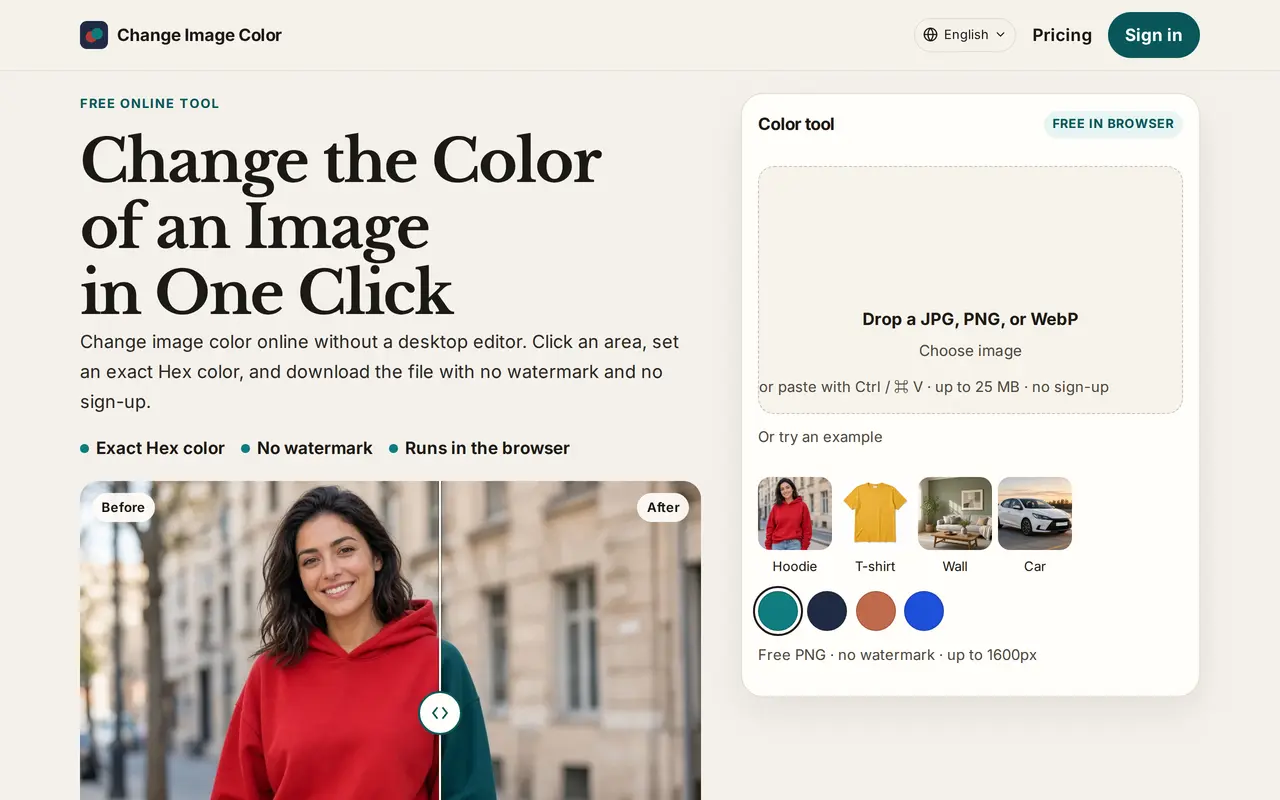
Change Image Color is a browser-based photo recoloring tool with an optional AI Refine edit. It lets users change the color of clothing, products, walls, cars, and logo shapes without repainting the whole picture. Users open a JPG, PNG, or WebP, click the area to change, and choose a color or enter a Hex code.
The standard editor changes selected pixels rather than generating a replacement object. It applies the target color to midtones while retaining lighter highlights and deeper shadows. AI Refine is a separate, credit-based edit that sends the image and selection to a server, then finishes the exact color in the browser. The standard recolor runs locally without uploading the image.
Free downloads are watermark-free PNGs with a maximum long edge of 1600 pixels. Original-size HD exports require an account and either a subscription or credits. Files can be up to 25 MB. Hair recoloring is not supported, and fine edges may need a tighter selection and another edit.
What can Change Image Color do?
Selected-area recoloring
Click an object or area and change its color while leaving the rest of the image unchanged.
Exact Hex input
Enter a Hex code to set the target midtone color while retaining highlights and shadows.
AI Refine
Apply a separate server-based AI edit to the selected area for 5 credits per use.
Local browser editing
Run standard recoloring on your device without uploading the image or creating an account.
Free and HD exports
Download watermark-free PNGs up to 1600 pixels for free, or export at original size with a subscription or credits.
Who is Change Image Color for?
- E-commerce sellers
- Preview product color variants from an existing product photograph.
- Clothing designers
- Try different garment colors while retaining fabric texture and shading.
- Home decorators
- Visualize wall and furniture colors in photographs of a room.
- Brand designers
- Apply specified Hex colors to logo shapes and other selected image areas.
How much is Change Image Color?
Official pricingFree
Free
Pro
$9.90/mo
Max
$29.90/mo
Free plan: Unlimited local recoloring and watermark-free PNG exports up to 1600px, plus 5 signup credits for one AI Refine.
Frequently asked questions
What can I use for free?
Local recoloring is unlimited and requires no account. Free PNG downloads have no watermark and a maximum long edge of 1600 pixels. Signing up provides 5 credits, enough for one AI Refine.
Are my images uploaded?
Standard recoloring runs locally in your browser without uploading your photo. AI Refine sends the image and selection to a server for the edit.
How much do AI Refine and HD exports cost in credits?
Each AI Refine costs 5 credits. HD exports cost 1 credit per image with a credit pack, while Pro and Max include unlimited HD exports.
Which files can I edit?
The tool accepts JPG, PNG, and WebP files up to 25 MB. Free downloads are PNG files.
Can it recolor hair?
Hair recoloring is not supported. Supported examples include clothing, walls, car bodies, furniture, and logo shapes.
Change Image Color alternatives
Compare alternatives- 1
 CanvaCreate presentations, graphics, photos, and videos with AI-assisted design tools.
- 2
 PixelcutGenerate and edit product photos, brand images, and videos with AI.
- 3
 FotorEdit and enhance photos, generate images, and create designs with AI tools.
- 4
 Bing Image CreatorGenerate images from text and edit photos with AI tools and templates.
- 5
 MagnificGenerate and edit AI images and videos on iPhone, iPad, and Mac.
More AI Photo Editors
See more
OpenArt
AI Image Generators
Generate and edit AI images, videos, characters, music, and voiceovers in one workspace.

Photoroom
AI Product Photography
Create and edit product photos, listing images, and video ads with AI.

Adobe Firefly
AI Image Generators
Generate and edit images, videos, and audio with AI.

Topaz Labs
AI Image Enhancers
AI tools to upscale, sharpen, denoise, and restore photos and videos.

remove.bg
AI Background Removers
Remove image backgrounds automatically and create replacement backdrops with AI.

Cutout.Pro
AI Background Removers
Edit and enhance photos, remove backgrounds, and generate images and videos with AI.