
Cutout.Pro
Visit websiteEdit and enhance photos, remove backgrounds, and generate images and videos with AI.
Verified Nov 2, 2026
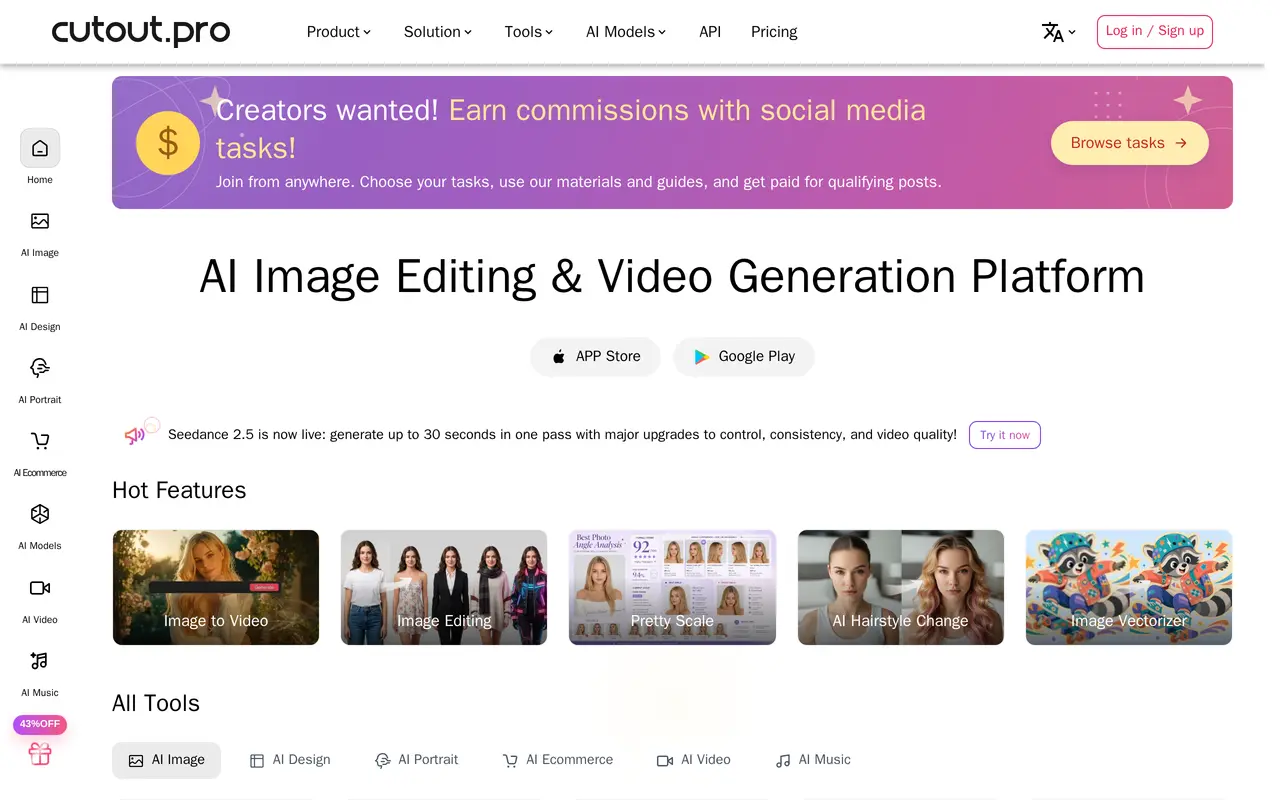
What is Cutout.Pro?
Cutout.Pro is an AI platform for editing photos, creating visual content, and generating videos. Its tools cover image and video background removal, object removal, face cutouts, photo enhancement, upscaling, and colorization. It also includes portrait effects, passport photo creation, image vectorization, and image-to-video generation.
Users can choose individual editing tools or access image and video generation models through the platform. The range suits tasks such as preparing product photos, restoring older pictures, making social content, and producing customized print designs. Developers can integrate visual processing into their own applications through an API, including workflows that process large volumes of images or videos.
Image editing uses a credit system. Background removal and image retouching cost one credit per image, while cartoon selfies, passport photos, enhancement, and colorization cost two. A free account includes ongoing previews and five free credits. Paid options include monthly credit subscriptions with limited rollover and one-time credit purchases that do not expire.
What can Cutout.Pro do?
Background and object removal
Remove photo or video backgrounds, isolate faces, and erase unwanted objects from images.
Photo enhancement and restoration
Upscale images, enhance photo quality, colorize pictures, and apply color correction.
Image and video generation
Create images and videos using a selection of AI models, including image-to-video tools.
Portrait and design tools
Create passport photos, cartoon selfies, greeting cards, wallpapers, and other visual designs.
Visual processing API
Integrate image and video processing into applications and automate high-volume editing workflows.
Who is Cutout.Pro for?
- E-commerce sellers
- Prepare product images by removing backgrounds and improving photo quality.
- Photographers and editors
- Use automated cutouts, enhancement, and restoration as part of photo editing workflows.
- Content creators
- Generate visual content and edit images or videos for social posts and promotional materials.
- Developers
- Add AI image and video processing to applications through the API.
How much is Cutout.Pro?
Official pricingFree Account
Free
Subscription Plan — 80 credits
$5/mo
Subscription Plan — 170 credits
$9.90/mo
Subscription Plan — 300 credits
$16.90/mo
Subscription Plan — 550 credits
$29/mo
Subscription Plan — 1000 credits
$49/mo
Subscription Plan — 1450 credits
$69/mo
Subscription Plan — Custom
See website
Pay as you go — 30 credits
$4.99 one-time
Pay as you go — 300 credits
$39 one-time
Pay as you go — 900 credits
$79 one-time
Pay as you go — 3000 credits
$199 one-time
Free plan: Free previews indefinitely and five free credits with a free account.
Frequently asked questions
Can I use Cutout.Pro for free?
A free account includes free previews indefinitely and five free credits. Inviting friends can earn additional credits.
How many credits does image editing use?
Image background removal and image retouching use one credit per image. Cartoon selfies, passport photos, enhancement, and colorization use two credits per image.
Do unused credits expire?
Subscription credits can roll over up to five times the monthly credit allowance. Pay-as-you-go credits remain available indefinitely.
Can I change or cancel a subscription?
Subscriptions can be upgraded, downgraded, or canceled at any time. A 14-day money-back guarantee is offered.
Does Cutout.Pro offer an API?
Yes. Developers can use its APIs to integrate image and video processing into their applications.
Cutout.Pro alternatives
Compare alternatives- 1
 PhotoEditorAIEdit, retouch, and restyle photos in your browser using text prompts.
- 2
 RemoveLayerRemove backgrounds, erase unwanted objects and text, and sharpen photos with AI.
- 3
 AiartyDesktop AI tools for enhancing images and videos and removing image backgrounds.
- 4
 Removal.AIRemove photo backgrounds automatically and edit the results online or through an API.
- 5
 PixMagicEdit and restyle photos, remove backgrounds, and create short videos in your browser.
More AI Background Removers
See more
remove.bg
AI Background Removers
Remove image backgrounds automatically and create replacement backdrops with AI.

PixRemove
AI Background Removers
Remove image backgrounds and unwanted objects with AI, then edit and export cutouts.

Video Background Remover
AI Background Removers
Remove video backgrounds and export transparent clips or add a new backdrop.