PixMagic
Visit websiteEdit and restyle photos, remove backgrounds, and create short videos in your browser.
Verified Nov 2, 2026
What is PixMagic?
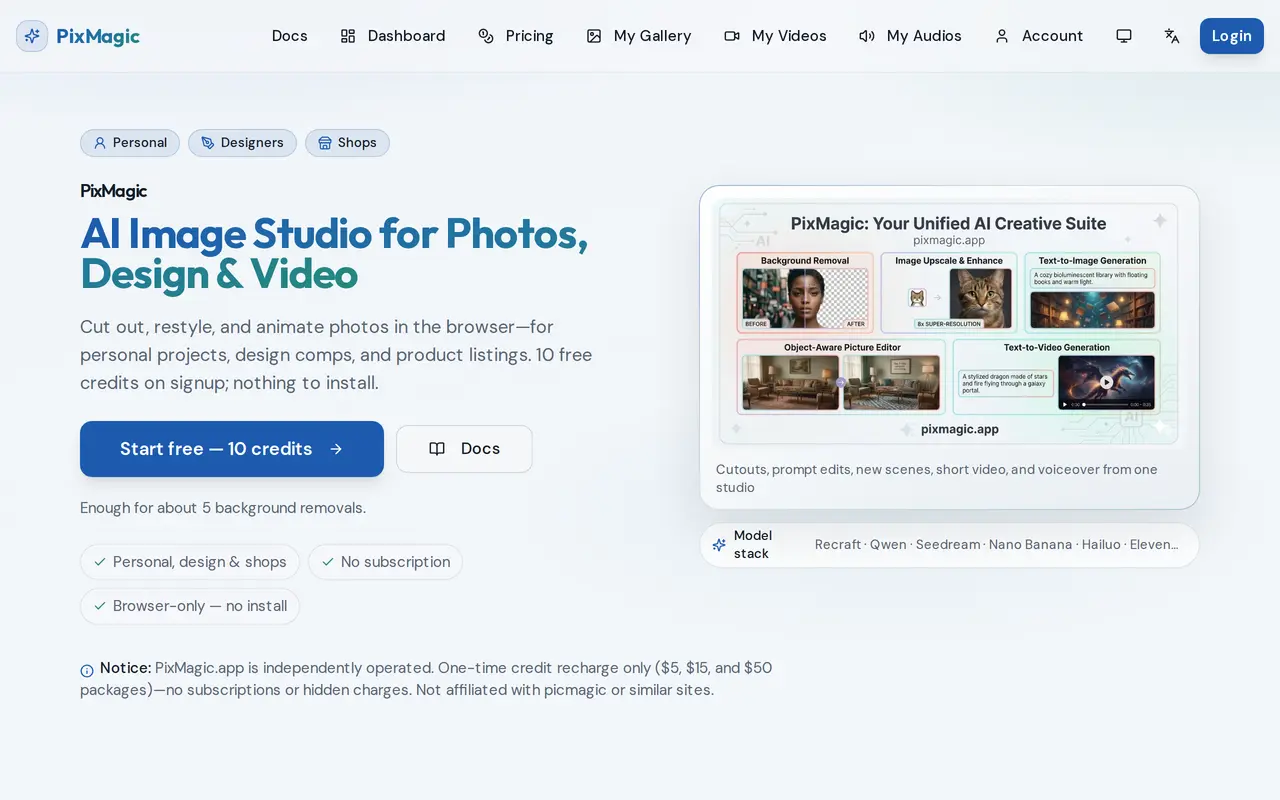
PixMagic is a browser-based AI studio for editing personal photos, preparing design assets, and creating product imagery. It combines background removal, prompt-based photo editing, reference-driven image generation, image-to-video conversion, and text-to-speech in one workspace. Users can recolor or relight photos, clean up images, place subjects in new scenes, or turn a still image into a short clip.
The workflow starts by uploading a JPG, PNG, or WEBP file up to 10 MB and choosing a tool. Background removal produces transparent PNGs, while image restyling supports 1K, 2K, and 4K output. Video tools use models including Hailuo 2.3 Pro and Veo3 Fast, and ElevenLabs Turbo 2.5 provides MP3 voiceovers. Results can be downloaded as PNG, JPEG, MP4, or MP3 files and saved in a personal library for reuse.
PixMagic uses credits rather than subscriptions. Signup includes 10 free credits, enough for five background removals but not an image-to-video generation, which costs 25 credits. Additional credits are sold in one-time packs, never expire, and are refunded when a processing task fails. Sexually explicit generation is prohibited.
What can PixMagic do?
Background removal
Remove backgrounds from portraits, products, and design assets to create transparent PNGs.
Prompt-based photo editing
Use text instructions to recolor, relight, or clean up photos, with 2K and 4K editing options.
Reference-driven restyling
Generate new scenes and restyled images from a reference photo at 1K, 2K, or 4K resolution.
Image-to-video generation
Turn still images into short clips for social posts, portfolios, and ads.
Text-to-speech voiceovers
Convert text into downloadable MP3 voiceovers using ElevenLabs Turbo 2.5.
Media library
Keep generated images, videos, and audio in your account for later reuse.
Who is PixMagic for?
- Designers
- Create cutouts, visual concepts, and reference-based restyles for design projects.
- Online shops
- Prepare product photos, listing imagery, and short promotional clips.
- Content creators
- Produce social videos, edited photos, and voiceovers for tutorials and ads.
- Personal users
- Remove backgrounds and restyle personal photos without installing editing software.
How much is PixMagic?
Official pricingExperience Pack
$5 one-time
Basic Pack
$15 one-time
Premium Pack
$50 one-time
Free plan: Signup includes 10 free credits, enough for five background removals.
Frequently asked questions
Can I try PixMagic for free?
Signup includes 10 free credits, enough for five background removals. Image-to-video generation costs 25 credits, so the signup allowance does not cover a video.
Does PixMagic require a subscription?
No. Credits are purchased through one-time packs costing $5, $15, or $50, with no automatic renewal.
Do credits expire?
Credits never expire.
What happens if a task fails?
Credits used for a failed processing task are automatically refunded to your balance.
Which files can I upload and download?
Image uploads support JPG, PNG, and WEBP files up to 10 MB. Depending on the tool, results download as PNG, JPEG, MP4, or MP3.
How are payments handled?
Payments take place through Creem's hosted checkout. PixMagic does not store your full card number, and an empty credit balance does not trigger another payment.
PixMagic alternatives
Compare alternatives- 1
 Cutout.ProEdit and enhance photos, remove backgrounds, and generate images and videos with AI.
- 2
 PhotoEditorAIEdit, retouch, and restyle photos in your browser using text prompts.
- 3
 PixRemoveRemove image backgrounds and unwanted objects with AI, then edit and export cutouts.
- 4
 remove.bgRemove image backgrounds automatically and create replacement backdrops with AI.
- 5
 Removal.AIRemove photo backgrounds automatically and edit the results online or through an API.
More AI Photo Editors
See more
Canva
AI Graphic Design
Create presentations, graphics, photos, and videos with AI-assisted design tools.

OpenArt
AI Image Generators
Generate and edit AI images, videos, characters, music, and voiceovers in one workspace.

Photoroom
AI Product Photography
Create and edit product photos, listing images, and video ads with AI.

Pixelcut
AI Product Photography
Generate and edit product photos, brand images, and videos with AI.

Adobe Firefly
AI Image Generators
Generate and edit images, videos, and audio with AI.

Fotor
AI Photo Editors
Edit and enhance photos, generate images, and create designs with AI tools.