
Editaimg
Visit websiteEdit photos with text prompts, remove objects, upscale images, and create product scenes.
Verified Nov 2, 2026
What is Editaimg?
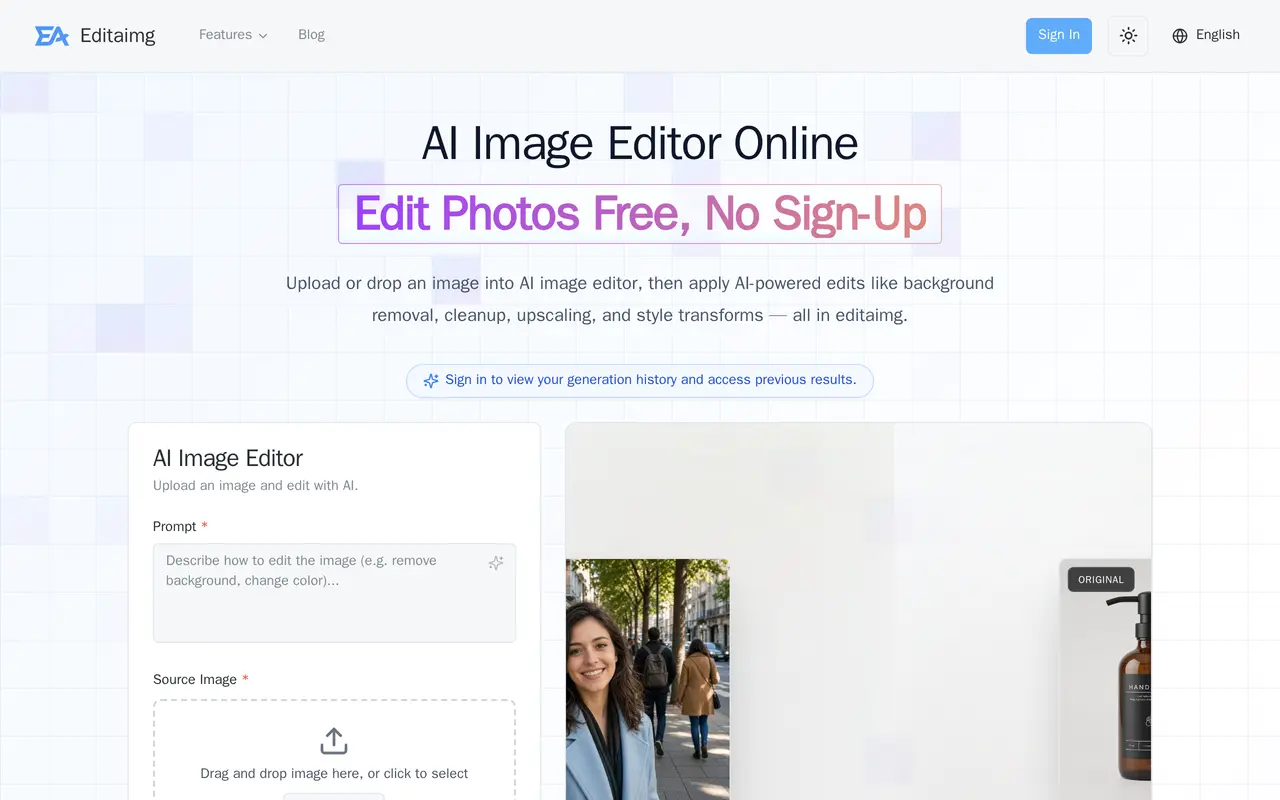
Editaimg is a browser-based AI image editor for photo cleanup, product imagery, and creative transformations. Users upload an image, describe the change they want in a text prompt, choose output settings, and generate an edited version. It supports background removal, object replacement, recoloring, upscaling, and changes to lighting or artistic style.
For online sellers, Editaimg can place products into lifestyle scenes, retouch jewellery against white backgrounds, and change text on packaging or listing images. Its text tools also add, remove, or translate image text into more than 130 languages while aiming to preserve the original formatting. Portrait tools include closed-eye correction, smile retouching, and hairstyle previews.
The editor accepts up to eight source images, each no larger than 50 MB, and offers aspect-ratio controls and 1K or 2K output options. Users can start editing without signing up; signing in provides access to generation history. Paid usage is available through one-time credit packs with no expiration rather than a subscription.
What can Editaimg do?
Prompt-based image editing
Describe changes to objects, backgrounds, colors, outfits, or styles using plain-language prompts.
Background and object cleanup
Remove backgrounds or unwanted objects and reconstruct the surrounding image.
Product photography
Place products in lifestyle scenes, retouch jewellery, and update text on product images.
Image text editing and translation
Add, change, remove, or translate image text into over 130 languages while preserving its visual formatting.
Image upscaling
Double a photo's dimensions while preserving sharpness, texture, and fine details.
Portrait retouching
Correct closed eyes, adjust smiles, and preview different hairstyles or hair colors.
Who is Editaimg for?
- Online sellers
- Create lifestyle product photos, white-background jewellery images, and updated listing graphics.
- Content creators
- Clean up images, replace objects, and apply visual styles through text prompts.
- Personal photo editors
- Retouch portraits, remove distractions, and preview hairstyle changes without specialist editing skills.
How much is Editaimg?
Basic
$9.90 one-time
Standard
$29.90 one-time
Pro
$49.90 one-time
Free plan: Free editing is available to start without signing up.
Frequently asked questions
Can I use Editaimg without an account?
You can start editing for free without signing up. Signing in lets you view generation history and access previous results.
Does Editaimg require a subscription?
No. Paid usage comes in one-time credit packs: Basic offers 160 credits for $9.90, Standard offers 800 for $29.90, and Pro offers 4,000 for $49.90. Credits do not expire.
What are the image upload limits?
You can select up to eight images, with a maximum size of 50 MB per image.
Can I control the output resolution and aspect ratio?
The editor offers 1K and 2K resolution options and multiple aspect ratios. Selecting 2K for an unsupported aspect ratio switches the output to 1:1.
Editaimg alternatives
Compare alternatives- 1
 AirbrushEdit and retouch photos with AI tools for portraits, object removal, and enhancement.
- 2
 PhotoroomCreate and edit product photos, listing images, and video ads with AI.
- 3
 PixelcutGenerate and edit product photos, brand images, and videos with AI.
- 4
 Cutout.ProEdit and enhance photos, remove backgrounds, and generate images and videos with AI.
- 5
 PokecutGenerate images, retouch portraits, and edit product photos with AI.
More AI Photo Editors
See more
Canva
AI Graphic Design
Create presentations, graphics, photos, and videos with AI-assisted design tools.

OpenArt
AI Image Generators
Generate and edit AI images, videos, characters, music, and voiceovers in one workspace.

Adobe Firefly
AI Image Generators
Generate and edit images, videos, and audio with AI.

Fotor
AI Photo Editors
Edit and enhance photos, generate images, and create designs with AI tools.

Topaz Labs
AI Image Enhancers
AI tools to upscale, sharpen, denoise, and restore photos and videos.

Bing Image Creator
AI Image Generators
Generate images from text and edit photos with AI tools and templates.