
AI Image Editor
Visit websiteEdit photos with text prompts and generate images from text or reference images.
Verified Nov 2, 2026
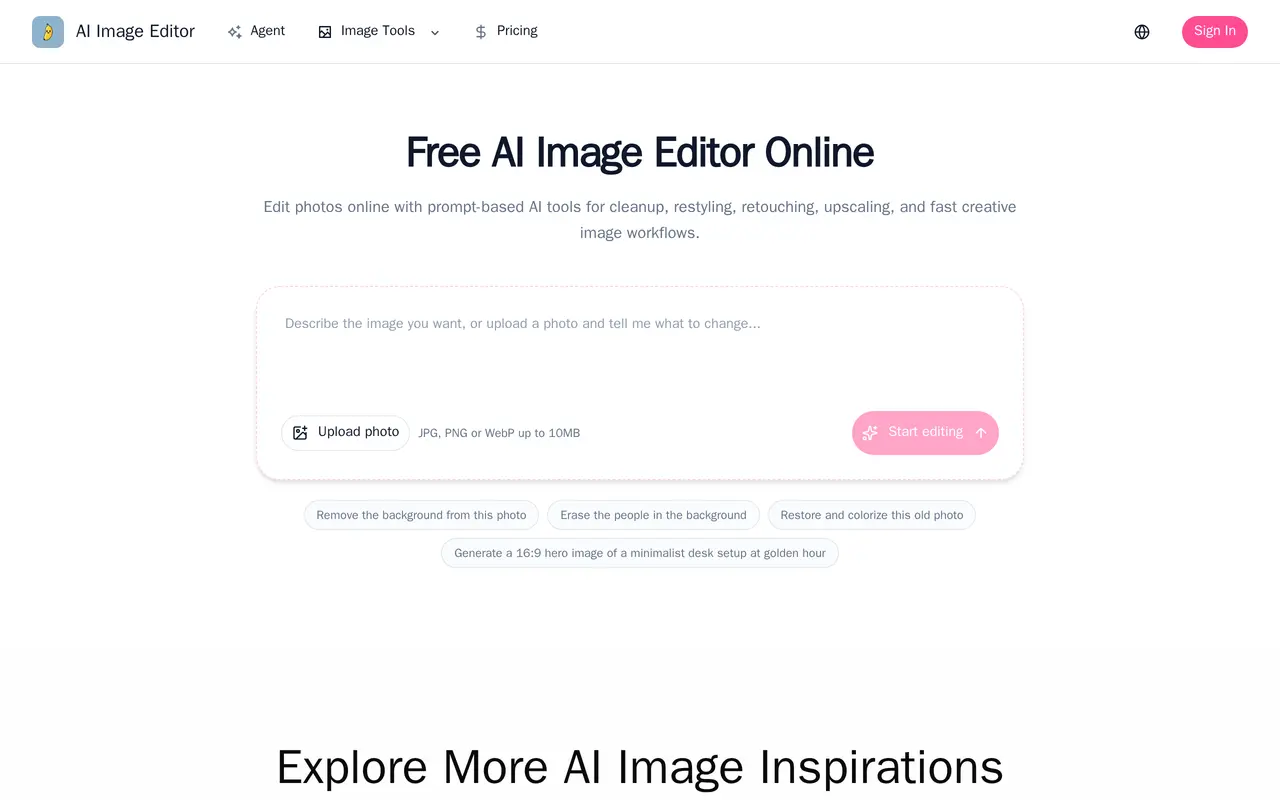
What is AI Image Editor?
AI Image Editor is a browser-based workspace for prompt-driven photo editing and image generation. Users can upload a photo and describe changes in ordinary language, or start with a text prompt to create a new image. Editing workflows include replacing backgrounds, removing unwanted objects, exploring outfits and hairstyles, and adjusting lighting, colors, and visual style.
The editor supports multiple reference images to guide subjects, settings, composition, and art direction. Users can specify details they want to preserve, such as a face, product shape, packaging, or framing, then refine results through follow-up prompts and compare variations. These workflows suit product listings, campaign visuals, social content, thumbnails, and brand illustrations.
Uploads accept JPG, PNG, or WebP files up to 10 MB. A photo enhancement workflow offers 2K and 4K output options, while separate browser tools handle cropping, rotation, color adjustments, filters, drawing, and compression. AI generation and editing use credits, with consumption varying by model, resolution, and task settings.
What can AI Image Editor do?
Prompt-based photo editing
Describe changes to an uploaded image and refine the result through follow-up messages.
Background and object removal
Replace backgrounds or remove distracting objects and generate scenery to fill the cleared area.
Text-to-image generation
Create new visuals from written prompts, with optional reference images to guide the result.
Multiple image references
Combine subject, product, setting, and style references to guide composition and visual treatment.
Photo enhancement
Request clearer detail and balanced lighting, with 2K and 4K output options in the enhancement workflow.
Manual finishing tools
Crop, rotate, flip, adjust colors, apply filters, draw, and compress images, then export PNG, JPEG, or WebP files.
Who is AI Image Editor for?
- Ecommerce sellers
- Turn catalog photos into lifestyle scenes and refresh product backgrounds for listings and landing pages.
- Content creators
- Generate and restyle images for social posts, covers, and thumbnails.
- Marketing and brand teams
- Explore campaign directions and create visual variations using shared brand and product references.
How much is AI Image Editor?
Official pricingPro
$30/mo
Lite
$15/mo
Free
Free
Free plan: The Free plan includes 10 credits for image generation and editing.
Frequently asked questions
Can I use AI Image Editor for free?
The Free plan includes 10 credits for image generation and editing. Credit costs vary by model, resolution, and task settings.
What files can I upload?
The editor accepts JPG, PNG, and WebP images up to 10 MB.
Can I use more than one reference image?
Yes. Multiple reference images can guide the subject, style, setting, or composition of a generation.
How do credits work?
Credits pay for AI image generation and editing, with the amount depending on the model and task settings. You can check credit usage for completed tasks in your account.
Can I download completed images?
All listed plans include downloads of completed images.
AI Image Editor alternatives
Compare alternatives- 1
 FotorEdit and enhance photos, generate images, and create designs with AI tools.
- 2
 Bing Image CreatorGenerate images from text and edit photos with AI tools and templates.
- 3
 PokecutGenerate images, retouch portraits, and edit product photos with AI.
- 4
 GPT ImageGenerate, edit, and upscale images using text prompts and reference photos.
- 5
 PhotoEditor.aiEdit, restore, upscale, and generate images with browser-based AI tools.
More AI Photo Editors
See more
Canva
AI Graphic Design
Create presentations, graphics, photos, and videos with AI-assisted design tools.

OpenArt
AI Image Generators
Generate and edit AI images, videos, characters, music, and voiceovers in one workspace.

Photoroom
AI Product Photography
Create and edit product photos, listing images, and video ads with AI.

Pixelcut
AI Product Photography
Generate and edit product photos, brand images, and videos with AI.

Adobe Firefly
AI Image Generators
Generate and edit images, videos, and audio with AI.

Topaz Labs
AI Image Enhancers
AI tools to upscale, sharpen, denoise, and restore photos and videos.