
ClipDance
Visit websiteGenerate and edit AI videos from text, images, and references with synchronized audio.
Verified Nov 2, 2026
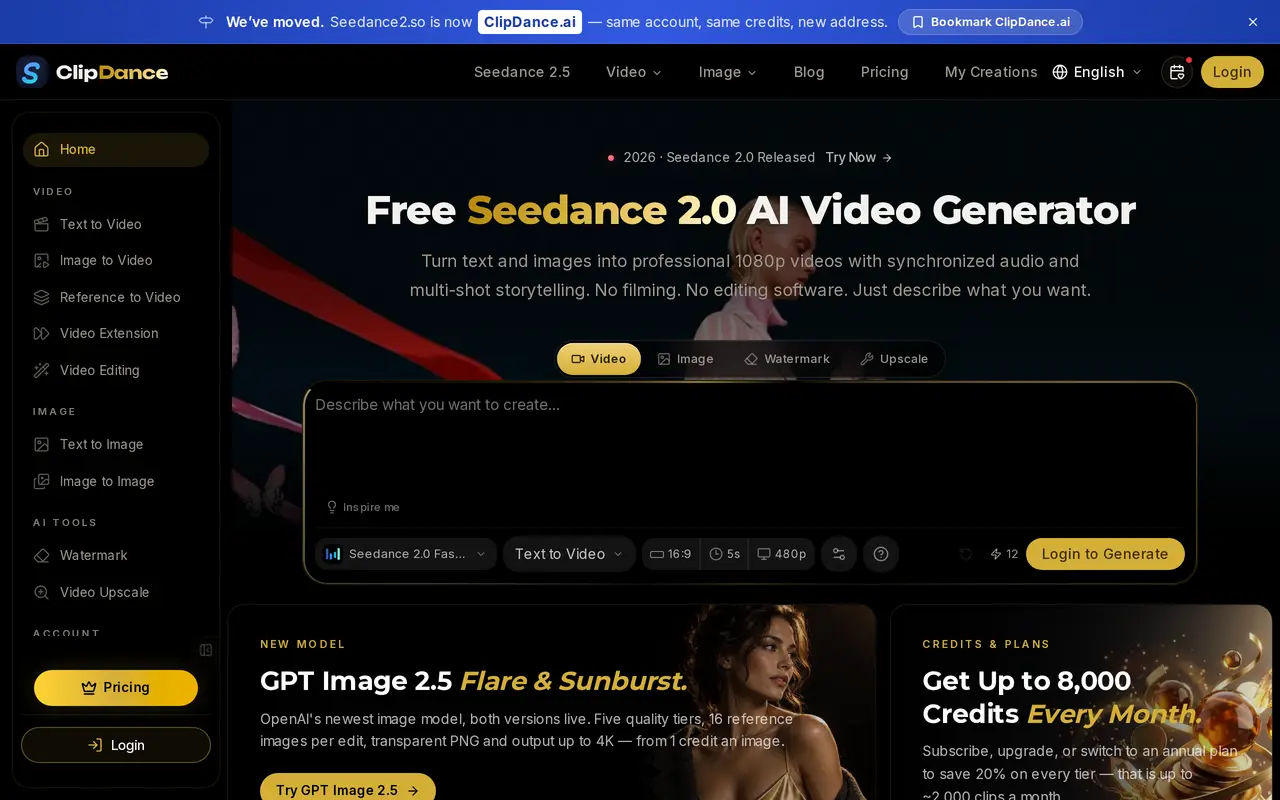
What is ClipDance?
ClipDance is a browser-based AI creation platform for generating videos and images with multiple models, including Seedance. It is an independent service rather than a ByteDance product. Users can describe a scene, upload a photo, or combine image, video, and audio references to guide a video’s appearance and motion.
Its video tools support text-to-video, image animation, reference-guided generation, clip extension, and prompt-based editing. Seedance workflows can generate dialogue, sound effects, and ambient audio alongside the visuals. Additional controls include first and last frames, music beat synchronization, and multilingual lip-sync. Templates combine image generation with video generation for projects such as travel vlogs, outfit routines, and character animation.
ClipDance also includes text-to-image and image-to-image tools. Access and output limits depend on the selected model and subscription tier, with paid plans adding higher resolutions and priority processing. Generations consume credits based on settings such as duration and resolution. New accounts receive three free credits; subscription credits reset each billing cycle, while purchased credit packs expire after 30 days.
What can ClipDance do?
Text and image video generation
Create video clips from written prompts or animate uploaded images, with optional first- and last-frame control.
Multimodal references
Use images, video clips, and audio references to guide composition, style, and motion.
Audio and lip-sync
Generate synchronized dialogue, effects, and ambient audio, with beat-sync and multilingual lip-sync workflows.
Video editing and extension
Upload a clip to edit it through prompts or extend it within the browser workspace.
Two-step video templates
Combine a generated reference image or storyboard with a video generation step for repeatable creative workflows.
AI image generation
Generate images from text or edit existing images using a selection of AI image models.
Who is ClipDance for?
- Content creators
- Create short videos, travel vlogs, and music-driven content for social platforms.
- Animators and artists
- Animate illustrations, manga panels, and characters using reference-guided video generation.
- Filmmakers
- Generate cinematic clips with reference inputs, synchronized sound, and multi-shot storytelling.
- Marketing teams
- Produce product demos, promotional clips, and other commercial video content.
How much is ClipDance?
Official pricingPro
$29.99/mo
Business
$79.99/mo
Enterprise
$199.99/mo
Custom
See website
100 credits
$12.99 one-time
500 credits
$39.99 one-time
1500 credits
$79.99 one-time
2500 credits
$129.99 one-time
Free plan: New accounts receive three free credits, with no credit card required.
Frequently asked questions
Can I try ClipDance for free?
New accounts receive three free credits without a credit card. Free access includes standard models and all video styles at 1024px resolution.
Do credits expire?
Subscription credits reset at the end of each billing cycle and do not roll over. One-time credit packs expire 30 days after purchase.
Can I use generated videos commercially?
ClipDance states that users own their generated videos and can use them commercially without attribution. Paid plans also include commercial licensing.
Can I cancel or change my subscription?
You can cancel or change plans at any time, with changes taking effect at the next billing cycle. After cancellation, access continues until the current billing period ends.
What happens if a generation fails?
Credits are automatically returned when generation fails because of a system error. Credits already used for AI generation are otherwise non-refundable.
Does ClipDance offer API access?
The Custom plan includes API access for integrating generation into a team's own pipeline. Pricing is arranged with the vendor.
ClipDance alternatives
Compare alternatives- 1
 DeeVidCreate and edit AI videos, images, avatars, speech, and music in one workspace.
- 2
 Seedance ArtGenerate short videos from text and images with synchronized audio and reference controls.
- 3
 SeeddanceGenerate videos from text and images, with supporting image and audio tools.
- 4
 PixVerseGenerate and refine AI videos from text, images, and conversational instructions.
- 5
 FLUX 3Generate short AI videos from text or photos and create still images in a browser.
More AI Video Generators
See more
CapCut
AI Video Editors
Edit videos, generate visuals, and add AI captions, voiceovers, and audio cleanup.

OpenArt
AI Image Generators
Generate and edit AI images, videos, characters, music, and voiceovers in one workspace.

DeepAI
AI Image Generators
Generate images, videos and music, edit photos, and chat with AI in one platform.

Pixelcut
AI Product Photography
Generate and edit product photos, brand images, and videos with AI.

VEED
AI Video Editors
Generate, edit, subtitle, and dub videos with AI in one platform.

Adobe Firefly
AI Image Generators
Generate and edit images, videos, and audio with AI.