ManualFig.ai
Visit websiteTurns product photos and step lists into line drawings for instruction manuals.
Verified Nov 2, 2026
What is ManualFig.ai?
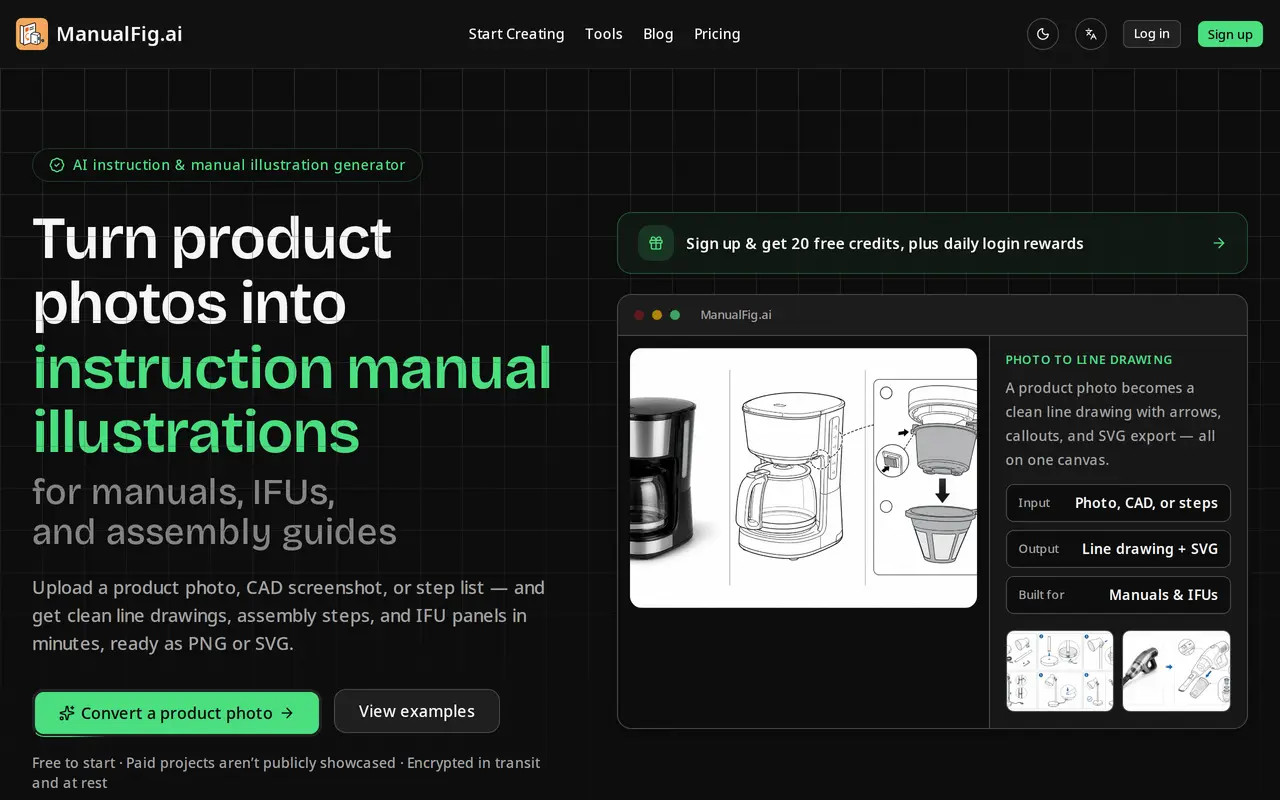
ManualFig converts product photos, CAD screenshots and written procedures into line drawings for instruction manuals, IFUs and assembly guides. You upload a reference image or paste a step list, describe the part or action in plain words, and get a figure that follows the product's real proportions while dropping reflections and background clutter.
The output is aimed at documentation rather than marketing: numbered panels with direction arrows, part callouts, zoom details, warnings and correct/incorrect comparisons. Figures sit side by side on a single canvas so a sequence keeps a consistent style and numbering, and any figure can be revised by describing the change in a sentence, with earlier versions kept.
Finished work exports as PNG or as stroke-based SVG whose line weights stay editable in Illustrator and other layout tools. Projects hold prompts, references, generated figures and edits together, and a saved reference plus prompt can be reused when the product changes.
It runs in the browser and is priced by credits: a free plan gives 10 credits at sign-up plus 10 daily credits that expire after 24 hours, with PNG export, limited SVG conversions and a standard queue. Paid tiers add monthly credits, versioned history, the SVG workflow, priority support and batch production. Commercial use is supported, and paid projects are not publicly showcased.
What can ManualFig.ai do?
Photo to line drawing
Turns a product photo, CAD screenshot, sketch or supplier image into clean line art that keeps the item's real shape.
Numbered assembly panels
Generates step-by-step panels with arrows, part callouts, zoom details and a clear finished state to confirm.
Safety and warning panels
Adds hazard symbols, pinch points, polarity marks and correct/incorrect comparisons for IFU and safety pages.
Sentence-based editing
Revise a figure by describing the change, and compare versions side by side on one canvas.
PNG and SVG export
Exports raster files or stroke-based SVG with editable line weights for layout tools, docs systems and print.
Reusable references
Keeps prompts, uploads and generated figures in one project and reuses them to keep a consistent style.
Who is ManualFig.ai for?
- Technical documentation teams
- Produce manual figures, work instructions and exploded views without hiring an illustrator.
- Manufacturers and medical device makers
- Create IFU panels, safety warnings and assembly steps that hold up in compliance review.
- Ecommerce sellers
- Build quick-start cards, packaging inserts and support diagrams for products such as furniture and appliances.
How much is ManualFig.ai?
Official pricingFree
Free
Starter
$30/mo
Pro
$60/mo
Business
$120/mo
Free plan: 10 credits on sign-up plus 10 daily credits that expire after 24 hours, with PNG exports and limited SVG conversions.
Frequently asked questions
How much does ManualFig cost?
Monthly billing is $30 for Starter (200 credits), $60 for Pro (600 credits) and $120 for Business (1,500 credits). Yearly billing is listed at 67% less, about $10, $20 and $40 per month, and there is a free plan.
What do credits pay for?
Credits pay for generated figures. The paid tiers work out at roughly one image per 10 credits, for example 200 credits for about 20 images.
Is there a free way to try it?
Yes. Signing up gives 10 credits plus 10 more each day, about one image a day, with PNG export, limited SVG conversions and a standard generation queue. Daily credits expire after 24 hours.
Can I export editable files?
Figures export as PNG or as stroke-based SVG whose line weights stay editable in Illustrator and other layout tools; an existing image can also be converted to SVG.
Can the figures be used commercially?
Commercial use is supported. Paid projects are not publicly displayed, while results made on the free plan may be shown anonymously in a community gallery.
Are uploaded photos private?
Uploads and projects are encrypted in transit and at rest, and paid projects are not publicly showcased.
ManualFig.ai alternatives
Compare alternatives- 1
 SciDraw AIGenerate scientific illustrations and data charts with editable exports.
- 2
 PatentFig AIGenerate and edit patent drawings from text, photos, sketches, and CAD screenshots.
- 3
 LogoAIGenerate logos, build brand kits, and create branded images and videos with AI.
- 4
 PlaygroundCreate and edit logos, merchandise graphics, posters, and social images with AI.
- 5
 SciFigCreate scientific illustrations, data charts and flowcharts with AI.
More AI Image Generators
See more
CapCut
AI Video Editors
Edit videos, generate visuals, and add AI captions, voiceovers, and audio cleanup.

OpenArt
AI Image Generators
Generate and edit AI images, videos, characters, music, and voiceovers in one workspace.

DeepAI
AI Image Generators
Generate images, videos and music, edit photos, and chat with AI in one platform.

Adobe Firefly
AI Image Generators
Generate and edit images, videos, and audio with AI.
Artlist
AI Video Generators
Generate and edit videos, images, voiceovers, music, and 3D assets in one workspace.

Fotor
AI Photo Editors
Edit and enhance photos, generate images, and create designs with AI tools.