
OmniEditor
Visit websiteGenerate and edit short videos using prompts, images, and reference clips.
Verified Nov 2, 2026
What is OmniEditor?
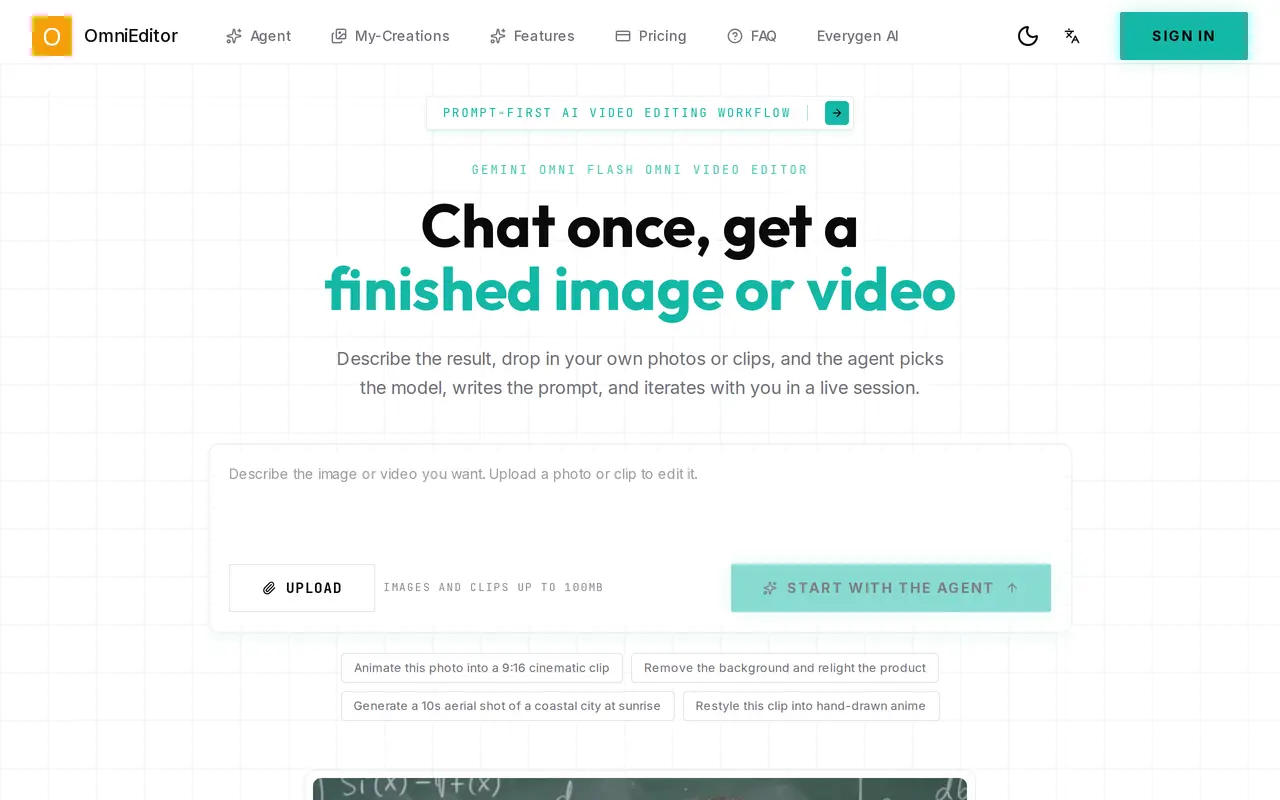
OmniEditor is a browser-based AI tool for generating and editing short videos through natural-language instructions. Users can start with a scene description or upload images and clips, then work with an agent that selects a model and prepares prompts. It supports text-to-video, image-to-video, and video-to-video workflows for social posts, product demos, ads, explainers, and other short-form content.
For existing footage, users can request changes to subjects, backgrounds, framing, or visual style while specifying which elements should stay consistent. Product images, character references, and style notes can guide variations and follow-up edits. The workflow also supports direction for camera movement, lighting, ambience, and speech timing, with users reviewing results and requesting further changes in the same session.
Uploads can be up to 100 MB. Free access includes 10 credits, up to two videos, and one task at a time, with watermarked output. Paid annual subscriptions provide larger credit allowances, more concurrent tasks, faster generation, watermark-free output, and private video visibility.
What can OmniEditor do?
Agent-guided creation
Describe a result and let the agent select a model, prepare the prompt, and help refine the output.
Multiple video inputs
Generate videos from text, still images, existing clips, and visual references.
Prompt-based video edits
Request changes to subjects, backgrounds, framing, and style while identifying elements to preserve.
Reference-led variations
Use product, character, layout, and style references to guide consistency across edits.
Camera and audio direction
Include camera motion, lighting, ambience, speech timing, and beat-related instructions in creative prompts.
Who is OmniEditor for?
- Content creators
- Create short-form videos, social posts, streaming intros, and visual variations.
- Marketing teams
- Develop product videos, launch teasers, short ads, and campaign variants.
- Educators
- Use prompt-led video workflows to create explainers and educational clips.
How much is OmniEditor?
Official pricingFree
Free
Pro
$300/yr
Lite
$150/yr
Free plan: 10 free credits for up to two watermarked videos, with one task at a time.
Frequently asked questions
Can I use OmniEditor for free?
The free plan includes 10 credits, up to two videos, and one parallel task. Free outputs have watermarks.
What inputs can I use?
OmniEditor supports text prompts, images, videos, and reference images or clips. Users can upload images and clips up to 100 MB.
Can I edit an existing video with prompts?
Yes. Video-to-video editing lets you request targeted changes and specify which parts of the original clip should remain.
What do the paid subscriptions include?
Pro costs $300 per year and includes 31,000 annual credits, up to 3,100 videos, and three parallel tasks. Lite costs $150 per year and includes 13,000 annual credits, up to 1,300 videos, and two parallel tasks. Both include watermark-free output, faster generation, private video visibility, and priority support.
OmniEditor alternatives
Compare alternatives- 1
 Kling 4.0Generate and edit videos from text, images, and references with multiple AI models.
- 2
 Wan 2.7Generate and edit short videos using text, images, and video references.
- 3
 Seedance 3.0Generate and edit videos with synchronized audio using text and media references.
- 4
 PictoryCreate and edit videos from prompts, scripts, URLs, slides, images and audio.
- 5
 AI Brainrot Video GeneratorTurn ideas, scripts and PDFs into short videos with AI voices and timed captions.
More AI Video Editors
See more
CapCut
AI Video Editors
Edit videos, generate visuals, and add AI captions, voiceovers, and audio cleanup.

Clideo
AI Video Editors
Edit videos online with automatic subtitles, translation, and text-to-speech tools.

VEED
AI Video Editors
Generate, edit, subtitle, and dub videos with AI in one platform.
DomoAI
AI Video Generators
Generate, animate, and restyle videos from text, images, and existing footage.

Runway
AI Video Generators
Generate and edit video, images, and audio with AI creative tools and APIs.

Magic Hour
AI Video Generators
Generate and edit AI videos, images, and audio in a shared web studio.