
EzImage
Visit websiteGenerate images from text or photos, edit selected areas, and upscale to 4K.
Verified Nov 2, 2026
What is EzImage?
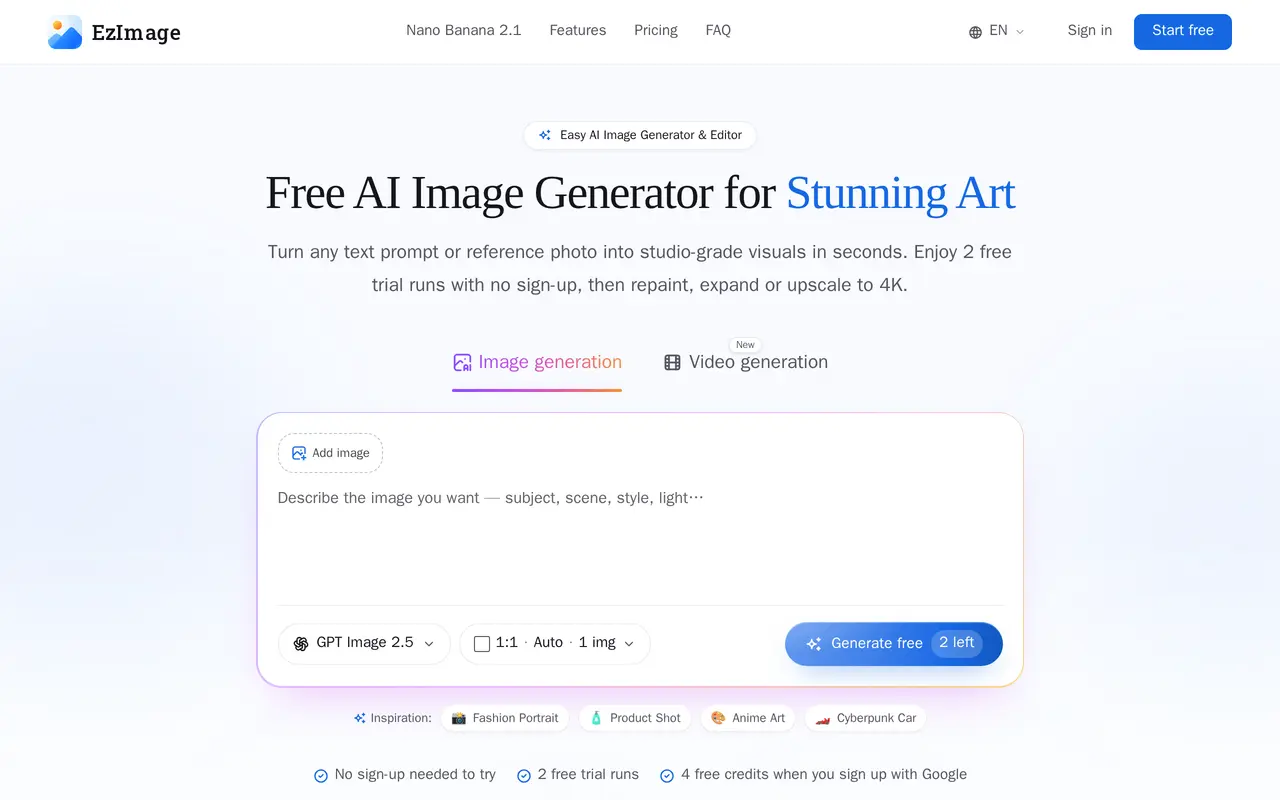
EzImage is a browser-based AI image generator and editor for product imagery, social graphics, and visual concepts. Users can enter a text prompt or upload a reference photo, choose a model and aspect ratio, then generate images. Available model options include GPT Image 2.5, Google Gemini, and ByteDance Seedream.
Its editing tools let users repaint selected regions, remove unwanted objects, and expand an image beyond its original borders. Reference photos can guide composition or style. EzImage also offers 4× upscaling, direct 4K generation on supported models, and PNG downloads. Paid plans support up to four images per run and include creation history. Video generation supports text-to-video, image-to-video, and first-and-last-frame inputs.
The service works on phone and desktop browsers. Users can try two generation runs without signing up and receive four free credits when registering with Google. Subscriptions provide monthly credit allocations, while one-time credit packs are available without a subscription and expire after 90 days. Image output counts vary by model, and credits also cover editing operations.
What can EzImage do?
Text and reference image generation
Generate images from written prompts or reference photos, with model selection and square, portrait, or widescreen formats.
Selective AI editing
Brush over an area to replace content, erase objects, or expand the canvas beyond its original borders.
4K output and upscaling
Upscale images by 4× or generate directly at 4K on supported models, then download PNG files.
Batch generation and history
Paid plans support up to four images per run and retain a history of creations.
AI video generation
Create videos from text, images, or first-and-last-frame inputs.
Who is EzImage for?
- Online sellers
- Create white-background product images, lifestyle scenes, and advertising visuals.
- Content creators
- Generate thumbnails, blog banners, and social media assets in different aspect ratios.
- Designers and marketers
- Explore visual concepts and produce promotional banners and campaign graphics.
- Artists and concept creators
- Develop character sheets, environment concepts, and anime storyboards from prompts.
How much is EzImage?
Official pricingBasic
$9.90/mo
Pro
$19.90/mo
Studio
$49.90/mo
600 credit pack
$14.90 one-time
1,250 credit pack
$29.90 one-time
2,600 credit pack
$59.90 one-time
Free plan: Two trial runs without sign-up and four free credits when registering with Google.
Frequently asked questions
Can I try EzImage without signing up?
You can try two generation runs without an account. Registering with Google provides four free credits, with no credit card required.
How much do subscriptions cost?
Basic costs $9.90 per month for 500 credits, Pro costs $19.90 per month for 1,200 credits, and Studio costs $49.90 per month for 3,500 credits. Credits refill monthly.
Can I buy credits without subscribing?
Yes. One-time packs offer 600 credits for $14.90, 1,250 credits for $29.90, or 2,600 credits for $59.90. They are available to free users, expire after 90 days, and do not auto-renew.
Can I edit my own photos?
You can upload a reference photo and use tools for repainting selected regions, erasing objects, expanding the canvas, and upscaling.
Do editing tools require separate purchases?
Subscription and credit-pack credits cover image generation, inpainting, erasing, expanding, and upscaling without separate add-ons.
EzImage alternatives
Compare alternatives- 1
 GPT ImageGenerate, edit, and upscale images using text prompts and reference photos.
- 2
 Image2GPTGenerate images from text and edit photos with prompts, masks, and style controls.
- 3
 AI Image EditorEdit photos with text prompts and generate images from text or reference images.
- 4
 PhotoEditor.aiEdit, restore, upscale, and generate images with browser-based AI tools.
- 5
 Remaker AIEdit, enhance, and generate images with AI tools, prompts, and photo effects.
More AI Image Generators
See more
CapCut
AI Video Editors
Edit videos, generate visuals, and add AI captions, voiceovers, and audio cleanup.

OpenArt
AI Image Generators
Generate and edit AI images, videos, characters, music, and voiceovers in one workspace.

DeepAI
AI Image Generators
Generate images, videos and music, edit photos, and chat with AI in one platform.

Adobe Firefly
AI Image Generators
Generate and edit images, videos, and audio with AI.
Artlist
AI Video Generators
Generate and edit videos, images, voiceovers, music, and 3D assets in one workspace.

Fotor
AI Photo Editors
Edit and enhance photos, generate images, and create designs with AI tools.