
ConceptDiagram
Visit websiteGenerate labeled concept maps, flowcharts, mind maps, and science diagrams from text.
Verified Nov 2, 2026
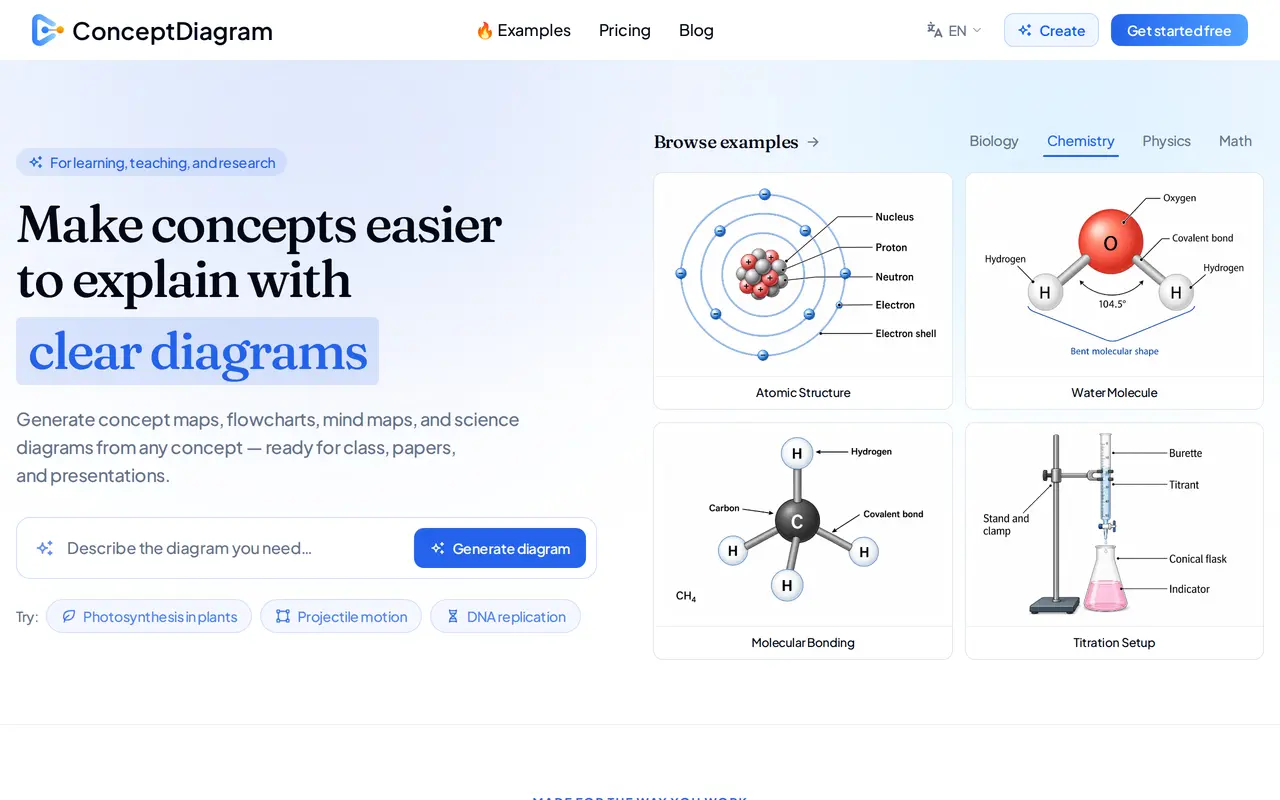
What is ConceptDiagram?
ConceptDiagram is a web-based AI diagram generator for students, teachers, and researchers. It turns a topic, question, or paragraph of notes into a structured, labeled visual. Supported formats include concept maps, flowcharts, mind maps, and science diagrams, with examples spanning biology, chemistry, physics, mathematics, and other subjects.
Users describe a concept in plain language, generate a diagram, and download it as an image for lessons, study materials, papers, or presentations. The tool offers multiple layout options and supports recoloring and relabeling figures. Teachers can create classroom visuals and handouts, while researchers can illustrate methods, models, and concepts for papers and posters.
ConceptDiagram is free to start, with one-time credit packs rather than subscriptions. Purchased credits do not expire. Every top-up includes all diagram styles and templates, access to the Diagram Ultra model for complex or text-heavy diagrams, priority generation, and high-resolution output up to 4K. Paid outputs are watermark-free and include commercial use without attribution.
What can ConceptDiagram do?
Text-to-diagram generation
Turn a topic, question, or paragraph of notes into a structured diagram with labels.
Multiple diagram formats
Create concept maps, flowcharts, mind maps, and science diagrams across different subjects.
Layout and label adjustments
Choose between diagram arrangements and recolor or relabel figures.
High-resolution exports
Top-ups unlock watermark-free image exports up to 4K for slides, documents, and print.
Diagram Ultra model
Access a model designed for complex, text-heavy diagrams with any credit top-up.
Commercial use
Use diagrams in courses, papers, and paid work without attribution with any top-up.
Who is ConceptDiagram for?
- Teachers
- Create labeled classroom visuals for slides, worksheets, and handouts across subjects and grade levels.
- Researchers
- Illustrate methods, models, and concepts for academic papers, posters, and presentations.
- Students
- Convert topics and study notes into visual maps for understanding and revision.
How much is ConceptDiagram?
Official pricingStarter Pack
$5 one-time
Creator Pack
$19 one-time
Studio Pack
$49 one-time
Free plan: Free to start with no credit card required.
Frequently asked questions
Can I try ConceptDiagram for free?
ConceptDiagram is free to start, and no credit card is required.
Does ConceptDiagram require a subscription?
No. It uses one-time credit purchases, and purchased credits do not expire.
How much do credit packs cost?
The Starter Pack costs $5 for 15 credits, the Creator Pack costs $19 for 70 credits, and the Studio Pack costs $49 for 220 credits. These correspond to approximately 15, 70, and 220 standard diagrams.
What does a credit top-up unlock?
Every top-up includes all styles and templates, Diagram Ultra, multiple layout options, priority generation, and watermark-free exports up to 4K.
Can I use the diagrams commercially?
Every top-up includes a commercial use license for courses, papers, and paid work, with no attribution required.
ConceptDiagram alternatives
Compare alternatives- 1
 SciDraw AIGenerate scientific illustrations and data charts with editable exports.
- 2
 SciFigCreate scientific illustrations, data charts and flowcharts with AI.
- 3
 PatentFig AIGenerate and edit patent drawings from text, photos, sketches, and CAD screenshots.
- 4
 CanvaCreate presentations, graphics, photos, and videos with AI-assisted design tools.
- 5
 FigmaDesign interfaces, build apps and websites, and collaborate with AI in a shared workspace.
More AI Graphic Design
See more
Stitch
AI Graphic Design
Generate UI designs and frontend code from text prompts, sketches, and screenshots.

Claude Design
AI Graphic Design
Create and refine branded visuals, presentations, and interface mockups with Claude.

Converge.AI
AI App Builders
AI agents for building apps and creating marketing images, designs, and videos.

LOGO.com
AI Logo Generators
Create and customize AI-generated logos, brand assets, and a matching website.

LogoAI
AI Logo Generators
Generate logos, build brand kits, and create branded images and videos with AI.

Uizard
AI Graphic Design
Turns text prompts, screenshots and sketches into editable UI designs and prototypes.