
Devin Desktop
Visit websiteManage local and cloud coding agents, review changes, and write code in one IDE.
Verified Nov 2, 2026
What is Devin Desktop?
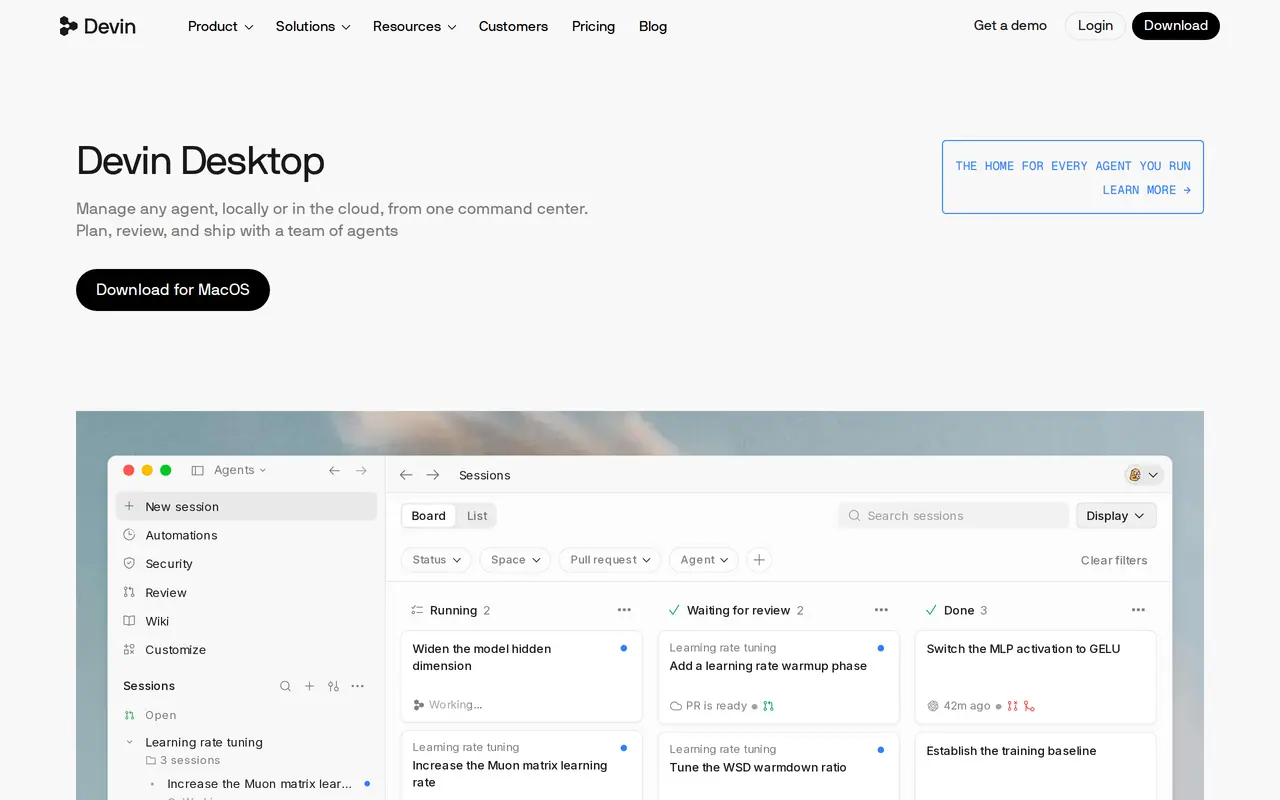
Devin Desktop is an AI development environment for writing code and managing coding agents across local machines and Devin Cloud. Formerly Windsurf, it combines an IDE with an Agent Command Center, where developers can organize sessions into spaces, monitor work in a Kanban view, and track pull requests.
Developers describe a task, then agents implement changes, investigate edge cases, and run tests. Devin can coordinate subagents that produce separate pull requests. Sessions can move between local and cloud execution while retaining their context, and cloud environments keep running when a laptop is closed. Support for the Agent Client Protocol brings different agents into the same workspace.
The editor includes inline edits, Tab completions, codebase context retrieval, and built-in Devin Review for examining diffs. Integrations connect development work with tools such as Slack, Linear, Notion, Sentry, and Figma. A free plan includes limited agent usage and unlimited inline edits and Tab completions; paid plans add higher quotas, broader model access, and cloud agents. Existing Windsurf users receive Devin Desktop through an update that preserves their settings, extensions, and work.
What can Devin Desktop do?
Agent Command Center
Organize agent sessions into spaces and monitor task status, reviews, and pull requests through board and list views.
Coordinated subagents
Delegate larger coding tasks to subagents that work on separate parts and produce their own pull requests.
Local and cloud handoff
Move sessions between your machine and Devin Cloud while keeping the same conversation context.
Built-in code review
Use Devin Review to inspect diffs and surface potential bugs within the development environment.
Codebase context and completions
Find relevant files and lines with Fast Context, and use inline edits and Tab completions while coding.
Agent and tool integrations
Manage agents through ACP and connect services including Slack, Linear, Notion, Sentry, and Figma.
Who is Devin Desktop for?
- Software developers
- Write, test, and review code while managing multiple local and cloud agent sessions.
- Engineering teams
- Coordinate agent-driven development with shared work, centralized billing, and administrative controls.
- Enterprise engineering organizations
- Manage development access with enterprise controls, SSO, and dedicated deployment options.
How much is Devin Desktop?
Official pricingFree
Free
Pro
$20/mo
Max
$200/mo
Teams
$80/mo
Enterprise
See website
Free plan: Light quota for coding with agents, limited model availability, unlimited inline edits, and unlimited Tab completions.
Frequently asked questions
Is Devin Desktop free to use?
The Free plan includes a light agent usage quota, limited model availability, unlimited inline edits, and unlimited Tab completions.
What happens to an existing Windsurf installation?
Devin Desktop arrives through a standard update. Existing plans, pricing, extensions, settings, workflows, and in-progress work carry over.
Can agents run locally and in the cloud?
Sessions can run on your machine or in Devin Cloud and move between them with the same context. Cloud agent access is included in Pro and higher plans.
How do paid usage limits work?
Paid plans include allowances that refresh daily and weekly. Usage depends on the model, task complexity, and reasoning required; additional usage can be purchased at API pricing.
How much does the Teams plan cost?
Teams costs $80 per month plus $40 per month for each full developer seat and supports up to 200 users.
Is a Mac download available?
Devin Desktop is available to download for macOS.
Devin Desktop alternatives
Compare alternatives- 1
 Devin DesktopManage local and cloud coding agents, review changes, and write code in one workspace.
- 2
 CursorAn AI coding editor and agent for building, testing, and reviewing software.
- 3
 JetBrainsAI-powered development tools and coding agents for developers and software teams.
- 4
 GitHub CopilotAn AI coding assistant and agent for writing, reviewing, and updating code.
- 5
 ClineAn open-source coding agent for your editor, desktop, terminal, and applications.
More AI Code Assistants
See more
Stitch
AI Graphic Design
Generate UI designs and frontend code from text prompts, sketches, and screenshots.

CodeRabbit
AI Code Assistants
AI code reviews, pull request triage, change explanations, and security monitoring.

Claude Code
AI Code Assistants
Anthropic's agentic coding tool that plans, edits, tests and opens pull requests.
Gemini CLI
AI Code Assistants
An open-source terminal agent for coding, codebase analysis, and workflow automation.

Bolt
AI App Builders
Build and publish apps, websites, and prototypes by chatting with AI.

Aider
AI Code Assistants
Pair program with AI models in your terminal to build and edit code.