
Cursor
Visit websiteAn AI coding editor and agent for building, testing, and reviewing software.
Verified Nov 3, 2026
What is Cursor?
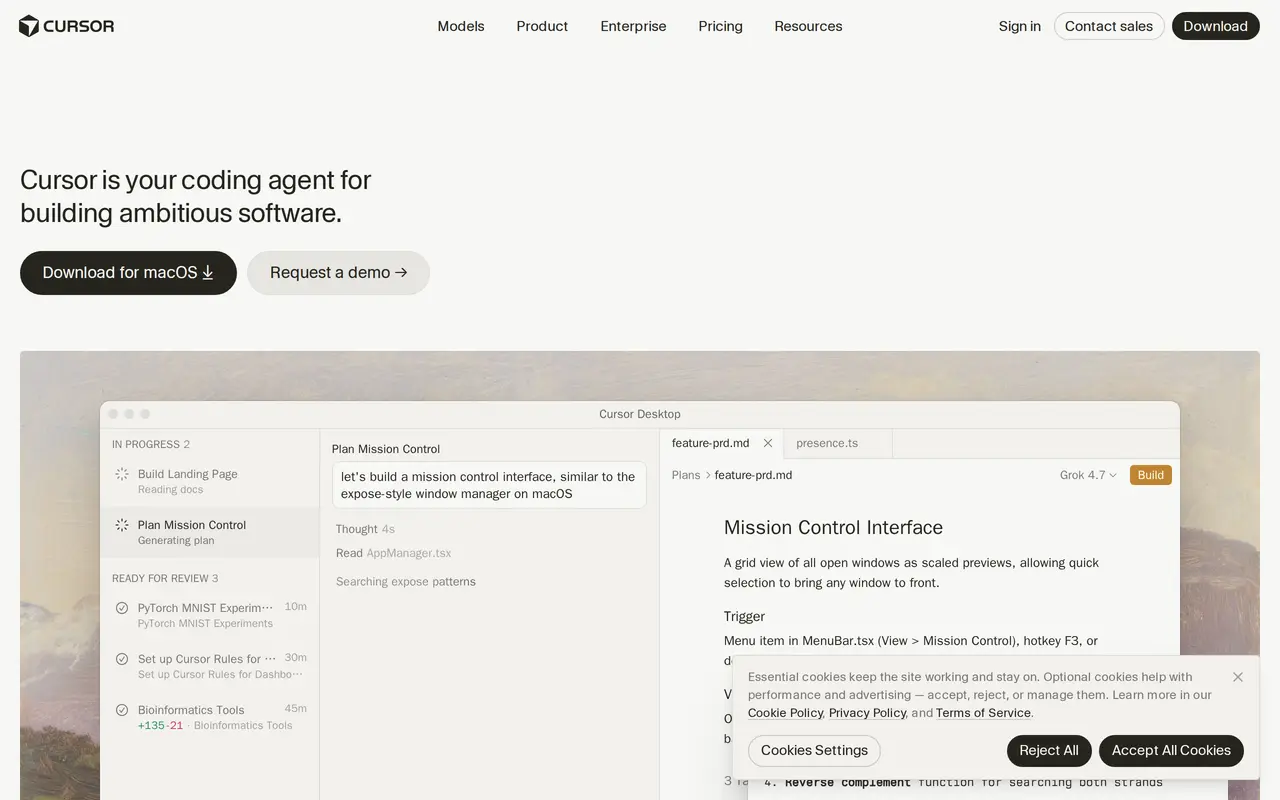
Cursor is an AI coding editor and agent that helps developers turn instructions into working software. Users can request targeted code edits, ask an agent to plan a feature, or delegate implementation tasks across a codebase. It combines context-aware completions, code navigation, and model selection with agent workflows that read project files and make changes.
Cloud agents run on their own computers and can build, test, and demonstrate features for review. Multiple agents can work in parallel on separate tasks. Cursor also offers a terminal interface, a Slack integration for delegating work from team conversations, and AI code reviews in GitHub. Project rules and shared team resources help guide how agents work.
A free plan includes limited AI usage, while paid subscriptions increase allowances and add capabilities such as cloud agents and code reviews. The Plus plan is restricted to Grok models; supported third-party models on higher plans are charged separately by usage. Team and enterprise options add centralized administration, privacy settings, and access controls.
What can Cursor do?
Code editing and planning
Ask for focused edits or have an agent plan and implement changes using context from project files.
Parallel cloud agents
Delegate tasks to agents that use their own computers to build, test, and demonstrate software changes.
Terminal workflow
Use Cursor's command-line interface to give agents instructions and reference files from your terminal.
Slack and GitHub workflows
Assign coding tasks through Slack and use AI reviews on GitHub pull requests.
Model selection
Choose models from several providers, with availability and separate usage charges depending on your plan.
Team administration
Manage billing, usage analytics, shared rules, privacy settings, and sign-on controls for development teams.
Who is Cursor for?
- Software developers
- Write, navigate, edit, and test code with assistance inside an editor or terminal.
- Engineering teams
- Delegate implementation tasks, run agents in parallel, and review changes through shared workflows.
- Enterprise engineering organizations
- Deploy coding agents with centralized administration, access policies, and spending controls.
How much is Cursor?
Official pricingFree
Free
Plus
$8/mo
Premium
$30/mo
Super
$100/mo
Ultra
$200/mo
Teams
$30/mo
Enterprise
See website
Free plan: The Free plan includes limited AI usage, including agent and chat requests.
Frequently asked questions
Can I use Cursor for free?
The Free plan includes limited AI usage, including limited agent and chat requests.
Are third-party models included in the subscription?
Plus supports only Grok models. On plans that support third-party models, their usage is billed separately at API list prices rather than included in the monthly subscription.
Can Cursor work outside its desktop editor?
Cursor has a command-line interface, supports task delegation through Slack, and reviews pull requests in GitHub. Cloud agents can also work on their own computers.
What does the Teams plan include?
Teams adds centralized billing and administration, usage analytics, team-wide privacy settings, custom chat data retention, and SAML/OIDC SSO. It also includes a team marketplace for internal rules, skills, and plugins.
Are taxes included, and can I cancel?
Prices exclude applicable taxes and fees. Subscriptions can be canceled, but cancellation must occur at least 24 hours before renewal to avoid additional charges.
Cursor alternatives
Compare alternatives- 1
 WarpAn AI-assisted terminal and coding agent for local and cloud software development.
- 2
 Claude CodeAnthropic's agentic coding tool that plans, edits, tests and opens pull requests.
- 3
 GitHub CopilotAn AI coding assistant and agent for writing, reviewing, and updating code.
- 4
 DevinAn AI coding agent that builds, tests, reviews, and maintains software.
- 5
 ClineAn open-source coding agent for your editor, desktop, terminal, and applications.
More AI Code Assistants
See more
JetBrains
AI Code Assistants
AI-powered development tools and coding agents for developers and software teams.
Stitch
AI Graphic Design
Generate UI designs and frontend code from text prompts, sketches, and screenshots.

CodeRabbit
AI Code Assistants
AI code reviews, pull request triage, change explanations, and security monitoring.

Devin Desktop
AI Code Assistants
Manage local and cloud coding agents, review changes, and write code in one IDE.
Gemini CLI
AI Code Assistants
An open-source terminal agent for coding, codebase analysis, and workflow automation.

Bolt
AI App Builders
Build and publish apps, websites, and prototypes by chatting with AI.