
Nanobanana2.1
Visit websiteGenerate and edit images with reference photos, inpainting, and up to 4K output.
Verified Nov 2, 2026
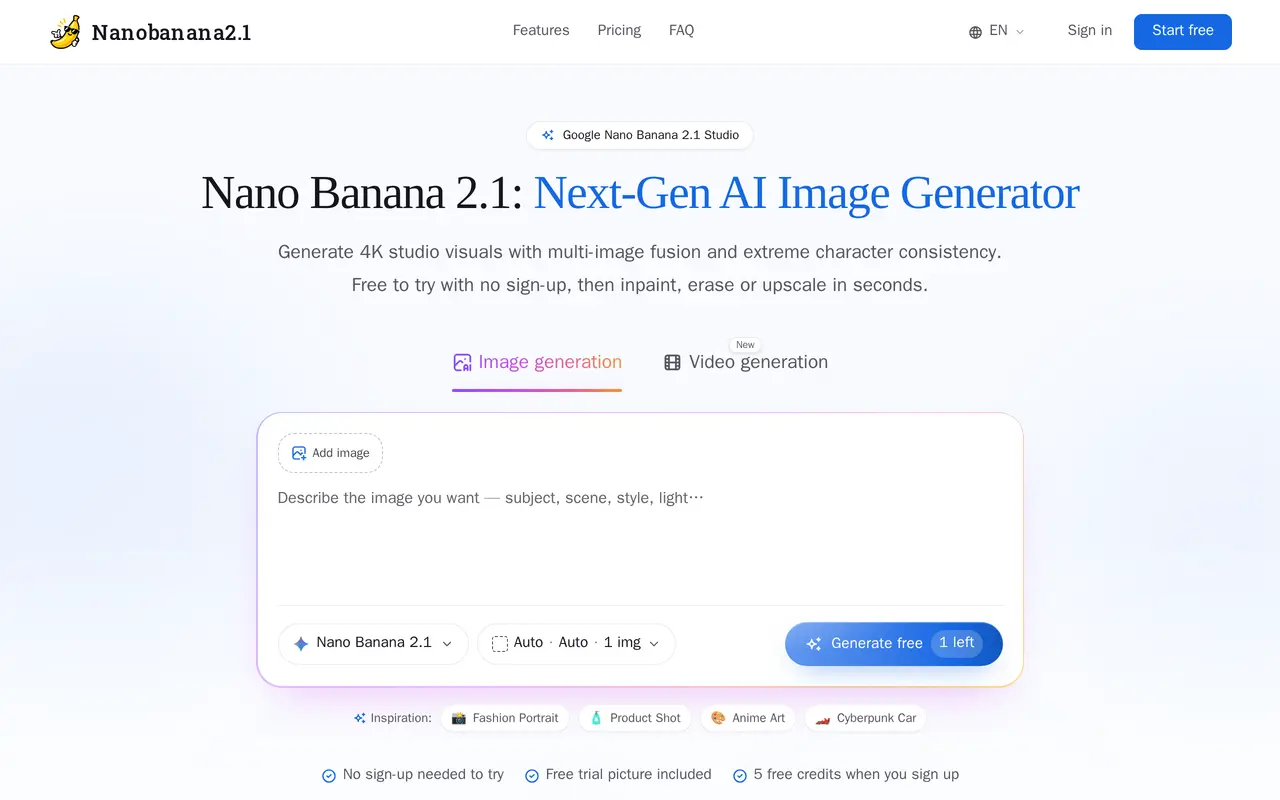
What is Nanobanana2.1?
Nanobanana2.1 is a browser-based AI image generation and editing studio for product photography, illustrated stories, marketing graphics, and concept art. Users start with a text description or upload up to 14 reference images, then choose an aspect ratio, resolution, and reasoning depth before generating. Reference images help guide character appearance, objects, and visual style across related images.
The editing canvas supports brushing over regions to change clothing, replace backgrounds, or remove objects. It also offers image expansion and 4× upscaling, with lossless PNG downloads. Output options include 1K, 2K, and 4K resolutions, panoramic formats, and batches of up to four images. Video tools support text-to-video, image-to-video, and first-and-last-frame inputs.
A trial image is available without registration, and signing up provides five free credits. Paid subscriptions replenish credits monthly, while one-time credit packs expire after 90 days. Credits cover image generation and editing operations, so usage depends on the tasks performed.
What can Nanobanana2.1 do?
Multi-image references
Upload up to 14 reference images to guide character identity, objects, textures, and style.
Brush-based image editing
Repaint selected areas, replace backgrounds, remove objects, or expand images in the browser.
High-resolution output
Generate images at 1K, 2K, or 4K, choose panoramic ratios, and download lossless PNG files.
Batch generation and upscaling
Create up to four images per run and enlarge images with 4× upscaling.
AI video generation
Generate videos from text or images, with support for first-and-last-frame inputs.
Who is Nanobanana2.1 for?
- Comic artists and animators
- Use reference images to maintain character appearance across panels, storyboards, and scenes.
- E-commerce sellers
- Place product images into different lifestyle settings and commercial backgrounds.
- Designers and marketing teams
- Create campaign banners, posters, social graphics, and other promotional visuals.
- Concept artists and game developers
- Develop character sheets and environmental concepts from prompts, sketches, and references.
How much is Nanobanana2.1?
Official pricingBasic
$9.90/mo
Pro
$19.90/mo
Studio
$49.90/mo
180 credit pack
$14.90 one-time
380 credit pack
$29.90 one-time
800 credit pack
$59.90 one-time
Free plan: One trial image without sign-up, plus five free credits on registration.
Frequently asked questions
Can I try Nanobanana2.1 for free?
You can generate a trial image without signing up. Registration provides five free credits, with no credit card required.
How much do subscriptions cost?
Basic costs $9.90 per month for 150 credits, Pro costs $19.90 for 360 credits, and Studio costs $49.90 for 1,000 credits. Subscription credits replenish monthly.
Can I buy credits without a subscription?
Yes. One-time packs offer 180 credits for $14.90, 380 for $29.90, or 800 for $59.90, including for free accounts. These credits expire after 90 days and do not auto-renew.
What image editing tools are included?
Editing tools include inpainting, erasing, image expansion, and 4× upscaling. Subscription and credit-pack credits can be used for generation and edits without separate add-ons.
Do I need local graphics hardware?
No. The studio runs in a web browser without a local GPU or Python setup.
Nanobanana2.1 alternatives
Compare alternatives- 1
 BerriooGenerate and edit images, create short videos, and turn scripts into speech.
- 2
 OpenArtGenerate and edit AI images, videos, characters, music, and voiceovers in one workspace.
- 3
 MagnificGenerate and edit AI images and videos on iPhone, iPad, and Mac.
- 4
 PixlrEdit photos and generate images, videos, and audio with AI in your browser.
- 5
 MagicShotGenerate and edit images, videos, voiceovers, and music in one AI studio.
More AI Image Generators
See more
CapCut
AI Video Editors
Edit videos, generate visuals, and add AI captions, voiceovers, and audio cleanup.

DeepAI
AI Image Generators
Generate images, videos and music, edit photos, and chat with AI in one platform.

Adobe Firefly
AI Image Generators
Generate and edit images, videos, and audio with AI.
Artlist
AI Video Generators
Generate and edit videos, images, voiceovers, music, and 3D assets in one workspace.

Fotor
AI Photo Editors
Edit and enhance photos, generate images, and create designs with AI tools.

ImagineArt
AI Image Generators
Generate and edit images, video and audio with brand controls and automated workflows.