
ChatCut
Visit websiteEdit and generate videos by describing the changes you want.
Verified Nov 2, 2026
What is ChatCut?
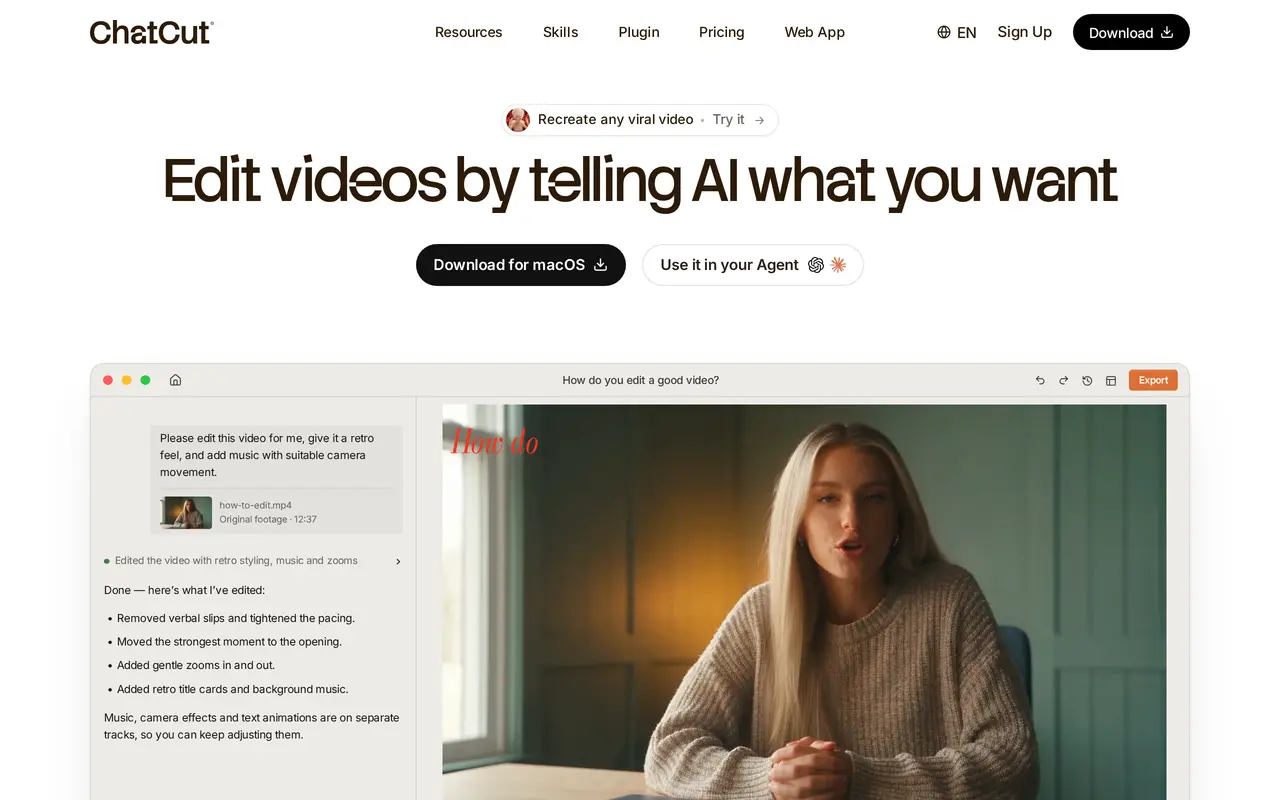
ChatCut is an AI video editor that runs in the browser and as a desktop app for macOS and Windows. You describe the edit you want in a prompt, such as removing verbal slips, tightening the pacing, adding retro titles and music, or moving the strongest moment to the opening. ChatCut returns a finished cut and an editable multi-track timeline where every clip, caption, graphic and audio layer can be adjusted by hand.
The editor also provides ready-made skills for common jobs: speech cleanup, automatic captions, video translation with dubbing and lip sync, long video to shorts, motion graphics in named styles, product ads, app promos and explainer videos. It can generate video clips and images with several models, create AI voiceovers, clone a voice, add avatars and make music. Some skills, such as motion graphics, work best with clear audio and a single presenter.
Projects can be exported to CapCut, Premiere, Final Cut Pro XML or DaVinci Resolve, or exported from the web app. ChatCut also offers a plugin for ChatGPT, Claude Code, Codex and WorkBuddy, so an agent can start or refine an edit. Free use includes a starter allowance and a 60-minute web export limit; paid plans are credit-based and remove the export limit.
What can ChatCut do?
Prompt-based editing
Describe the changes you want and ChatCut cuts, paces, adds music and titles, then returns an editable timeline.
Ready-made skills
One-click workflows for speech cleanup, captions, translation and dubbing, long video to shorts, motion graphics, promos and explainers.
Multi-track timeline
Every AI edit lands on a timeline and canvas for manual trimming, moving, text and color changes.
Export to editing apps
Send projects to CapCut, Premiere, Final Cut Pro XML or DaVinci Resolve, or export from the web app.
Agent plugin
Install the ChatCut plugin in ChatGPT, Claude Code, Codex or WorkBuddy to start and refine edits from an agent.
Media generation
Generate video clips, images, motion graphics, music, voiceovers, avatars and voice clones with supported models.
Who is ChatCut for?
- Creators
- Talking-head creators who need to cut filler, add captions and turn long videos into shorts.
- Marketing teams
- Teams producing product ads, app promos and social videos from product images and brand copy.
- Enterprise teams
- Organizations that need credit-based plans, no export limit and reusable voice clones for recurring projects.
How much is ChatCut?
Official pricingFree starter allowance
Free
100 credits / month
$25/mo
200 credits / month
$50/mo
800 credits / month
$200/mo
400 credits / month
See website
1,200 credits / month
See website
2,000 credits / month
See website
Free plan: The free starter allowance includes basic editing and exports, AI images, motion graphics, captions, music, avatars, voice cloning and previews, with a total web export limit of 60 minutes.
Frequently asked questions
What is ChatCut?
ChatCut is an AI video editor for desktop and browser. It edits existing footage, generates new media and lets you refine the result on a multi-track timeline.
How does conversational editing work?
You describe the changes in a prompt, such as adding a retro look, music and zooms. ChatCut returns a cut with an editable timeline, and you can keep adjusting by hand.
Is there a free plan?
Yes. The free plan includes basic editing and exports, AI images and motion graphics, AI captions and music, AI avatars and voice cloning previews, and a 60-minute web export limit.
How much do paid plans cost?
Paid plans are $25, $50 or $200 per month when billed monthly, or $252, $456 or $1,692 per year when billed annually, with 100, 200 or 800 credits per month.
Is ChatCut available on Windows?
Yes. ChatCut has a macOS download, a Windows download and a web app.
Can I use ChatCut with ChatGPT, Claude Code or Codex?
Yes. A ChatCut plugin can be installed in ChatGPT, Claude Code, Codex and WorkBuddy, and some features are free in those agents.
ChatCut alternatives
Compare alternatives- 1
 Vmake LabsCreate and edit AI product videos for social media, ads, and ecommerce.
- 2
 PictoryCreate and edit videos from prompts, scripts, URLs, slides, images and audio.
- 3
 VEEDGenerate, edit, subtitle, and dub videos with AI in one platform.
- 4
 PexoCreate and revise complete AI videos through conversation.
- 5
 invideoCreate and edit videos with AI agents on a collaborative multitrack timeline.
More AI Video Editors
See more
CapCut
AI Video Editors
Edit videos, generate visuals, and add AI captions, voiceovers, and audio cleanup.

Clideo
AI Video Editors
Edit videos online with automatic subtitles, translation, and text-to-speech tools.
DomoAI
AI Video Generators
Generate, animate, and restyle videos from text, images, and existing footage.

Runway
AI Video Generators
Generate and edit video, images, and audio with AI creative tools and APIs.

Magic Hour
AI Video Generators
Generate and edit AI videos, images, and audio in a shared web studio.

Wistia
AI Video Editors
Host, edit, and repurpose business videos with AI and track viewer engagement.