
SeaArt AI
Visit websiteGenerate and edit AI images and videos, remix templates, and share creations.
Verified Nov 3, 2026
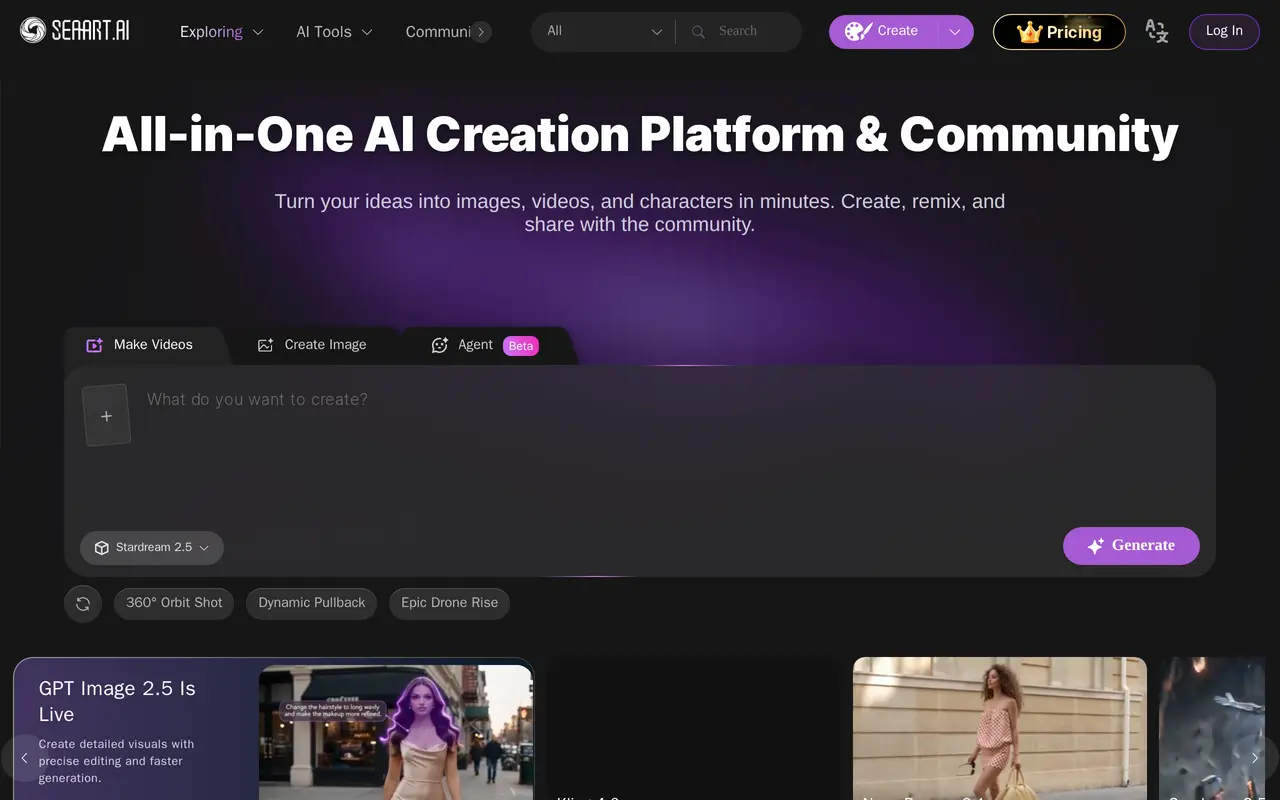
What is SeaArt AI?
SeaArt AI is an AI creation platform and community for generating and editing images and videos. Users can start with an image generator, choose a video tool, or remix a community template. Its creative options include illustrated styles, photo effects, product videos, character scenes, and camera-motion effects, giving creators several ways to develop visual content within one platform.
Image tools include generation, editing, upscaling, object erasing, background removal, and filters. Video options include image-to-video generation, reference-based video creation, lip sync, motion control, and multi-angle camera movement. Templates cover effects such as bullet time, dolly zooms, dance animations, and seasonal photo transformations. SeaArt also provides a public gallery where users can explore other creators’ work and find creations to remix. The platform combines these tools with access to multiple image and video models, rather than focusing on a single generation workflow.
What can SeaArt AI do?
AI image generation
Create images using multiple models, styles, and ready-made templates.
Image editing tools
Edit and upscale images, erase unwanted elements, remove backgrounds, and apply filters.
AI video creation
Generate videos from images or references and build scenes with a range of video models.
Motion and lip sync
Apply motion control, lip sync, camera movements, and effects such as bullet time and dolly zooms.
Remixable templates
Start from templates for character scenes, product videos, dance clips, and photo transformations.
Creator community
Explore a public gallery, share your creations, and remix work from other community members.
Who is SeaArt AI for?
- Visual creators
- Generate artwork, edit photos, and experiment with different visual styles.
- Video creators
- Create animated clips, character scenes, and videos with motion and camera effects.
- Product content creators
- Use product-video templates and image tools to make promotional visuals.
How much is SeaArt AI?
Official pricingFree
Free
Beginner
See website
Standard
See website
Professional
See website
Master
See website
Free plan: SeaArt AI offers a free plan with limited access and a daily generation allowance.
Frequently asked questions
Is SeaArt AI only an image generator?
No. It also offers video generation, image-to-video tools, lip sync, motion control, and image editing.
Can I explore and remix other creators’ work?
Yes. SeaArt has a community gallery with creations to explore and templates to remix.
SeaArt AI alternatives
Compare alternatives- 1
 OpenArtGenerate and edit AI images, videos, characters, music, and voiceovers in one workspace.
- 2
 Supawork AICreate AI videos, images, headshots, and effects, and translate academic PDFs.
- 3
 PicsartGenerate and edit images, videos, and audio with AI tools and creative workflows.
- 4
 Leonardo.AiGenerate, edit, upscale, and animate images with AI creative tools.
- 5
 Nanobanana2.1Generate and edit images with reference photos, inpainting, and up to 4K output.
More AI Image Generators
See more
CapCut
AI Video Editors
Edit videos, generate visuals, and add AI captions, voiceovers, and audio cleanup.

DeepAI
AI Image Generators
Generate images, videos and music, edit photos, and chat with AI in one platform.

Adobe Firefly
AI Image Generators
Generate and edit images, videos, and audio with AI.
Artlist
AI Video Generators
Generate and edit videos, images, voiceovers, music, and 3D assets in one workspace.

Fotor
AI Photo Editors
Edit and enhance photos, generate images, and create designs with AI tools.
ImagineArt
AI Image Generators
Generate and edit images, video and audio with brand controls and automated workflows.