
ReelWand
Visit websiteGenerate and edit product photos, portraits, illustrations, and brand visuals with AI.
Verified Nov 2, 2026
What is ReelWand?
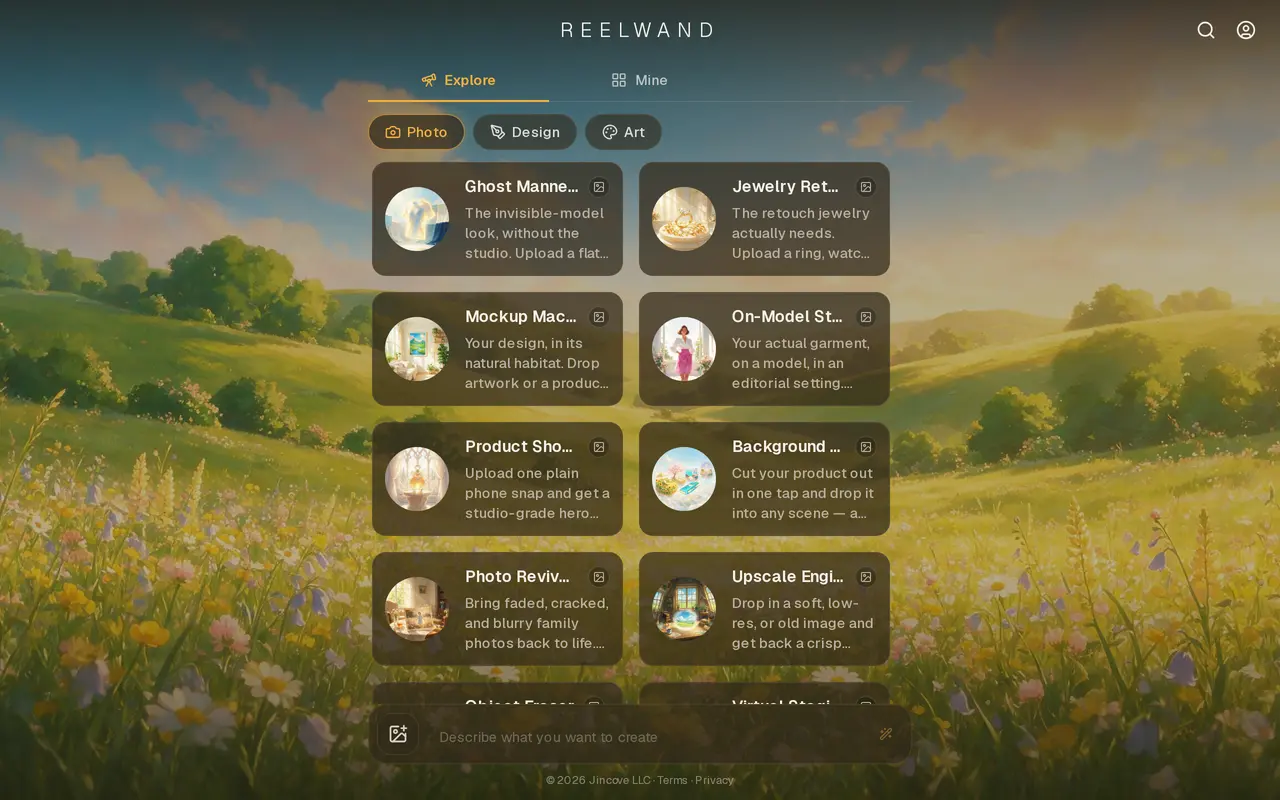
ReelWand is a web-based AI visual studio with specialized tools for product photography, portraits, design, and illustration. Users can upload images for tasks such as changing backgrounds, creating product scenes, retouching jewelry, restoring old photos, or staging empty rooms. It also includes tools for headshots, logos, posters, mockups, and other visual assets.
Image generation runs through Seedream 5.0 in sessions that retain context, allowing users to refine an earlier result with new instructions. Creators and teams can create private custom agents with their own instructions and keep brand rules in a knowledge layer. Product-focused tools cover white-background images, shadows, color variants, flat-lay layouts, and on-model clothing images.
Each image render currently costs four credits. The free plan provides eight one-time credits and watermarked output; paid monthly subscriptions provide recurring credit allowances and remove watermarks. Unused subscription credits do not roll over, while failed or cancelled generations return their held credits.
ReelWand handles generation and task-specific editing rather than full professional image production. It lacks layers, masks, RAW development, color management, and print output, so detailed compositing or press-ready work requires another editor. Video rendering is temporarily unavailable.
What can ReelWand do?
Product photography tools
Create product scenes, white-background images, shadows, color variants, and on-model apparel photos from uploaded images.
Session-based refinement
Refine previous renders with new instructions while retaining creative context within a session.
Custom agents and brand rules
Create private agents with custom instructions and store brand guidance in a knowledge layer.
Photo editing and restoration
Remove objects, swap backgrounds, restore damaged photos, and upscale images with dedicated tools.
Design and portrait tools
Generate headshots, logos, posters, mockups, illustrations, and other visual assets through specialized tools.
Who is ReelWand for?
- E-commerce sellers
- Create listing photos, product variants, apparel images, and lifestyle scenes from existing product shots.
- Creators and brand teams
- Produce branded visuals using custom instructions, stored brand rules, and iterative generation sessions.
- Real estate professionals
- Virtually furnish empty rooms and adjust lighting, skies, and exterior presentation in property photos.
How much is ReelWand?
Official pricingFree
Free
Plus
$15/mo
Premium
$39/mo
Pro
$99/mo
Max
$259/mo
Ultra
$649/mo
Enterprise
See website
Free plan: Eight one-time credits for two image renders with watermarked output.
Frequently asked questions
Can I use ReelWand for free?
The free plan includes eight one-time credits and access to all available image agents. At four credits per render, this covers two image renders with watermarked output.
How much do paid plans cost?
Monthly plans range from Plus at $15 for 400 credits to Ultra at $649 for 32,400 credits. Enterprise offers 100,000 monthly credits with custom pricing, and all paid plans remove watermarks.
Do unused credits roll over?
No. Paid credits reset each monthly billing period without carry-over. Failed or cancelled generations automatically return their held credits.
Can I cancel my subscription?
Subscriptions renew monthly until cancelled. Signed-in customers can manage billing or cancel through the Subscription option in the account menu, which opens Stripe's customer portal.
Does ReelWand generate video?
Video rendering is temporarily unavailable. Video runs cannot be started and are not included as a live paid feature.
Does ReelWand replace a full photo editor?
It supports generation and specialized editing tasks, but does not include layers, masks, RAW development, color management, or print output. Detailed compositing and press-ready work require a full editor.
ReelWand alternatives
Compare alternatives- 1
 Image To ImageEdit source photos into product images, ad variations, and campaign visuals with AI.
- 2
 NanoBanana ProGenerate and edit images with text prompts and multiple reference images.
- 3
 Get Img AIGenerate images and edit photos with text prompts across multiple AI models.
- 4
 Image to Image AI GeneratorEdit and restyle photos or sketches using reference images and text instructions.
- 5
 3D Camera ControlGenerate new camera angles from a single reference image using AI.
More AI Product Photography
See more
Photoroom
AI Product Photography
Create and edit product photos, listing images, and video ads with AI.

Pixelcut
AI Product Photography
Generate and edit product photos, brand images, and videos with AI.
FancyAI
AI Agents
Role-based AI agents for enterprise creative, analytics, and software workflows.
Pebblely
AI Product Photography
Create AI product photos with custom backgrounds for listings, ads, and social media.

Editaimg
AI Photo Editors
Edit photos with text prompts, remove objects, upscale images, and create product scenes.

ForgeEcho
AI Product Photography
Create ecommerce product photos, ad scripts, and voiceovers in one AI workspace.