
Image to Prompt
Visit websiteConvert reference images into text prompts for AI image generators.
Verified Nov 2, 2026
What is Image to Prompt?
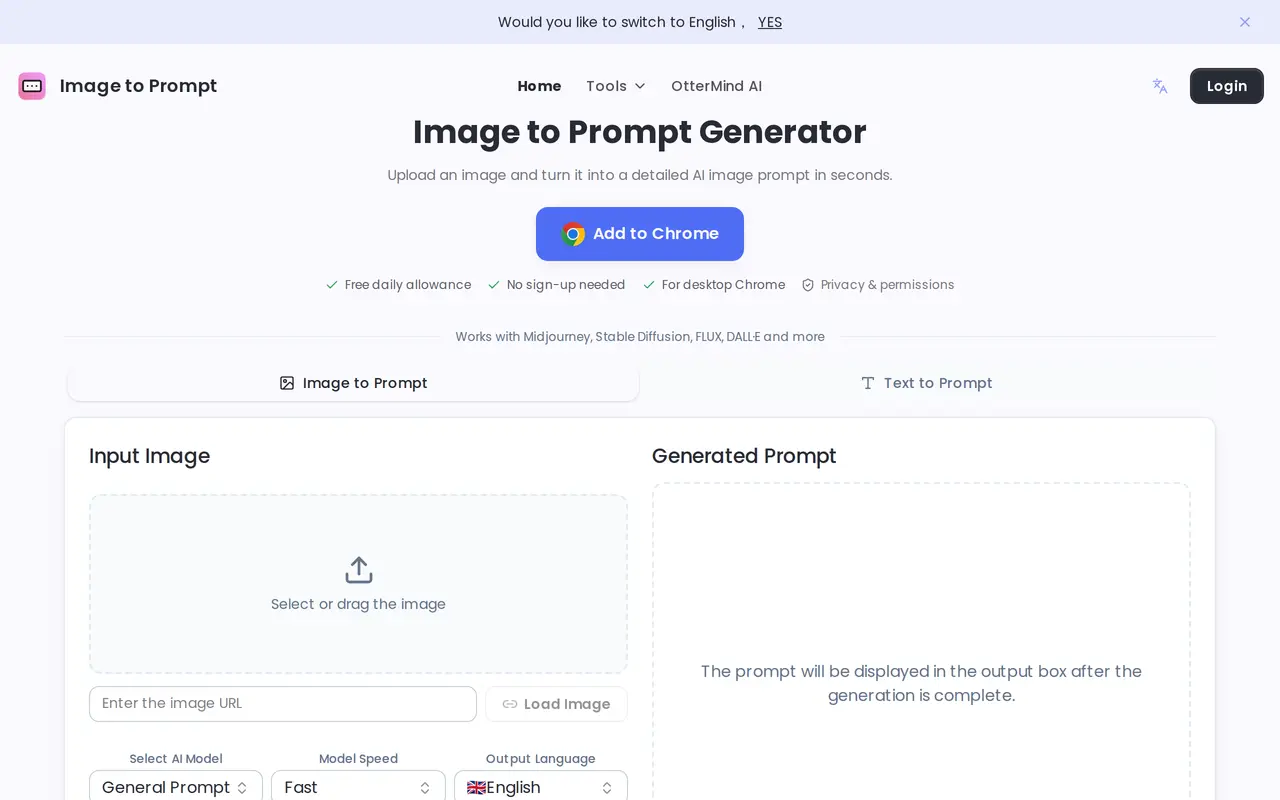
Image to Prompt uses AI to turn reference images into detailed text prompts for image-generation tools. It describes elements such as the subject, artistic style, lighting, composition, and mood, giving users a starting point for creating related images in Midjourney, Stable Diffusion, FLUX, DALL·E, and other models.
Users can upload an image, drag one into the browser, or load it from an image URL. The interface includes model and output-language selections. After generating a prompt, users can copy the text into their preferred image generator and manually adjust the wording to refine the result. JPEG and PNG are supported, and clear images with distinct subjects are recommended for more accurate descriptions.
The web generator is free, requires no registration, and allows unlimited generations. A desktop Chrome extension is also available with a free daily allowance. Uploaded images are deleted after prompt generation rather than retained on the service’s servers. The tool produces text prompts; users take those prompts to a separate image generator to create images.
What can Image to Prompt do?
Image-to-prompt conversion
Generate text describing a reference image’s subject, style, lighting, composition, and mood.
Upload or image URL
Choose a local image, drag and drop a file, or load an image from a URL.
Model and language selection
Select an AI model target and output language before generating a prompt.
Copyable prompt output
Copy the generated text into an image generator and edit it to refine the result.
Chrome extension
Access the tool through a desktop Chrome extension with a free daily allowance.
Who is Image to Prompt for?
- AI image creators
- Turn visual references into prompts for Midjourney, Stable Diffusion, FLUX, and other image generators.
- Visual designers
- Translate reference images and design concepts into descriptive text for creative work.
- Content creators
- Use image-based descriptions as starting points for visual content and creative ideas.
Frequently asked questions
Is Image to Prompt free?
The web generator is free with unlimited generations and does not require registration. The desktop Chrome extension has a free daily allowance.
Which image generators can use the prompts?
The prompts can be used with Midjourney, Stable Diffusion, FLUX, DALL·E, and other image-generation models.
Are uploaded images stored?
Uploaded images are deleted from the servers once prompt generation is complete.
What image formats are supported?
Supported formats include JPEG and PNG. Clear images with well-defined subjects are recommended.
Can I change an inaccurate prompt?
You can manually edit the generated text. Trying another image or a different view of the subject can also help refine the result.
Image to Prompt alternatives
Compare alternatives- 1
 EraserCreate and edit technical diagrams with AI using prompts, code, and files.
- 2
 ChatHubChat with multiple AI models side by side and compare their responses.
- 3
 ManusAn AI agent for executing tasks, automating workflows, and creating digital content.
- 4
 Use AIChat with multiple AI models, research the web, and create content in one workspace.
- 5
 FloatboatDesktop AI agents that prepare, execute, and follow up on work from your calendar.
More AI Productivity Tools
See more
Novastart
AI Agents
Organize desktop apps on a shared infinite canvas and work alongside AI agents.

Okou
AI Agents
Cloud AI teammate that runs multi-step work across your connected tools.
OpenWork
AI Agents
An open-source AI workspace for working with local files, tools, and team workflows.

Typeahead
AI Writing Assistants
On-device AI autocomplete that finishes sentences across Mac apps.

Viskey & Vida
AI Assistants
An AI work companion for research, documents, and tasks with persistent context.