
Floatboat
Visit websiteDesktop AI agents that prepare, execute, and follow up on work from your calendar.
Verified Nov 2, 2026
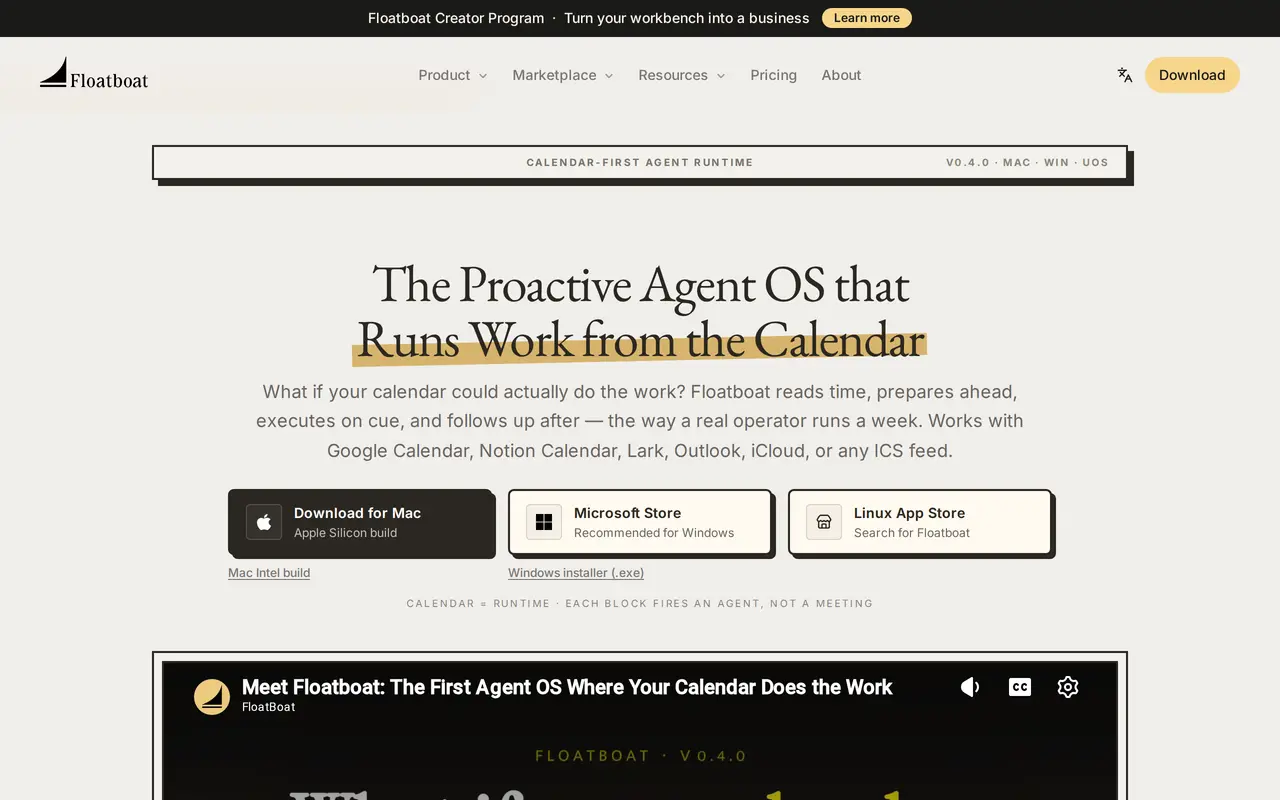
What is Floatboat?
Floatboat is a desktop AI workspace that uses calendar events to trigger work. It connects to Google Calendar, Notion Calendar, Lark, Outlook, iCloud, and ICS feeds, then uses meetings, deadlines, and routines to schedule preparation, execution, and follow-up. It is aimed at solo operators, creators, small businesses, and small teams.
Each event has an Agent Workspace containing files, run history, model choices, and decisions. Users can adjust prompts, switch models, or rerun individual steps. Reusable Combo skills and installable workflows handle tasks such as turning voice notes into presentations, drafting sales follow-ups, and preparing pull request drafts from tickets. Connections to external tools and MCP servers let agents work with business applications and local files, with permissions scoped to individual events.
Floatboat runs on Mac, Windows, and Linux/UOS. Its FloatIM feature supports group conversations with locally running agents on Mac. Usage is credit-based, with a free tier, paid subscriptions, and optional credit top-ups; access to models and processing priority varies by plan.
What can Floatboat do?
Calendar-triggered agents
Schedule agents to prepare before meetings, draft before deadlines, and follow up after events.
Persistent event workspaces
Keep files, execution history, model choices, and decisions together for each event, with controls to revise and rerun steps.
Installable skills and workflows
Install reusable Combo skills and workflows for document creation, scheduled tasks, browser actions, and other processes.
Tool and local file connections
Connect business apps, local documents, and MCP servers, with permission scopes set for individual calendar events.
Automatic model routing
Auto Mode chooses models for individual workflow steps and switches providers when rate limits interrupt a run.
Multi-agent group chat
FloatIM lets locally running agents on Mac divide roles, hand off work, and return drafts, research, and presentations.
Who is Floatboat for?
- Solopreneurs
- Automate preparation, deliverables, and follow-up around a calendar-driven working week.
- Creators
- Turn notes and other inputs into drafts, presentations, and reusable production workflows.
- Small businesses and studios
- Coordinate recurring operational tasks and share workspaces across small teams.
How much is Floatboat?
Official pricingFree
Free
Lite
$199/yr
Pro
$59.98/mo
Max
$199.98/mo
3,000 Credits Booster
$12.99 one-time
Free plan: A lasting free plan includes starter credits, selected models and features, and standard processing.
Frequently asked questions
Which calendars does Floatboat support?
Floatboat connects to Google Calendar, Notion Calendar, Lark, Outlook, iCloud, and other calendars available through ICS feeds.
Is Floatboat free to use?
The Free plan includes starter credits, selected models and features, standard processing, and local file storage. Paid subscriptions provide monthly credit allowances and additional capabilities.
Which desktop platforms are supported?
Floatboat offers Mac builds for Apple Silicon and Intel, Windows downloads through the Microsoft Store or an installer, and Linux/UOS availability.
Can I buy extra credits without changing plans?
A one-time booster pack costs $12.99 for 3,000 credits, valid for one year. You can purchase up to 20 packs per checkout without changing your subscription renewal terms.
Can I control agents from messaging apps?
Floatboat supports using agents through Telegram and Feishu/Lark.
Floatboat alternatives
Compare alternatives- 1
 ManusAn AI agent for executing tasks, automating workflows, and creating digital content.
- 2
 OkouCloud AI teammate that runs multi-step work across your connected tools.
- 3
 OpenWorkAn open-source AI workspace for working with local files, tools, and team workflows.
- 4
 AutoGPTCoordinate AI specialists for research, content, sales, and recurring workflows.
- 5
 Raycast AIUse AI models and agents to work with files, apps, and recurring tasks from your desktop.
More AI Agents
See more
Claude
AI Assistants
An AI assistant for research, writing, coding, and tasks across your files and apps.
Notion
AI Agents
Organize team knowledge, search connected apps, and automate work with AI agents.

Cursor
AI Code Assistants
An AI coding editor and agent for building, testing, and reviewing software.

JetBrains
AI Code Assistants
AI-powered development tools and coding agents for developers and software teams.

MiniMax
AI Models
AI models, developer APIs, and apps for language, video, speech, and music.

NoteGPT
AI Agents
An AI agent for research, summaries, documents, slides, and multimedia creation.