
HighReach
Visit websiteGenerate and edit videos, images, and audio with multiple AI models in one studio.
Verified Nov 2, 2026
What is HighReach?
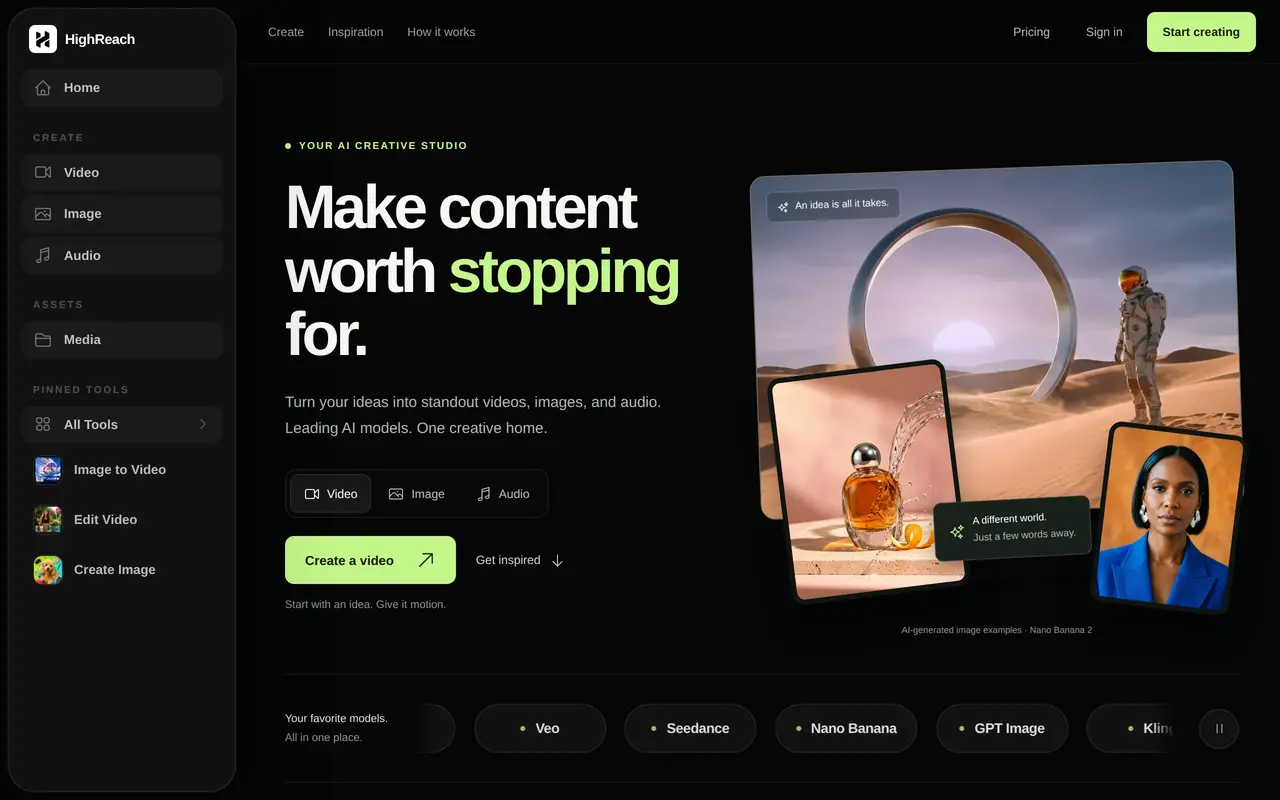
HighReach is a web-based AI creative studio for generating and editing videos, images, and audio. It brings models including Kling, Veo, Seedance, Nano Banana, and GPT Image into one workspace for creating product visuals, social content, ads, explainers, and short films.
Users choose a format, enter a prompt or start from an inspiration example, and add reference material where supported. Video tools include text-to-video, image-to-video, prompt-based editing, motion references, lip-sync, and upscaling. Image tools cover generation, editing, expansion, and variations, while the audio suite offers voiceovers, music, sound effects, voice cloning, and dubbing. Results can be refined and downloaded.
Subscriptions provide a monthly credit pool, with higher tiers offering more simultaneous generations and faster queues. Credit consumption varies by model, resolution, and video length, so the number of outputs depends on the workflow. All plans include commercial usage, making the studio relevant to individual creators, marketing teams, and agencies producing recurring content.
What can HighReach do?
Multi-model creative studio
Access video and image models including Kling, Veo, Seedance, Nano Banana, and GPT Image in one workspace.
Video generation and editing
Generate clips from text or images, edit existing footage with prompts, and guide movement with reference clips.
Image creation and refinement
Generate visuals, edit images, expand their boundaries, create variations, and upscale results.
Audio production
Create voiceovers, music, and sound effects, with additional tools for voice cloning, voice changing, and dubbing.
Lip-sync videos
Combine a speaker image with audio to create a talking-avatar video.
Editable inspiration prompts
Start from example visuals and prompts, then adapt them in the studio for your own project.
Who is HighReach for?
- Content creators
- Produce videos, images, and audio for reels, stories, and other recurring social content.
- Marketing teams
- Create product photography, campaign concepts, ads, and branded video content.
- Creative agencies
- Generate and iterate on visual assets for ongoing client campaigns.
How much is HighReach?
Official pricingStarter
$14/mo
Pro
$29/mo
Ultra
$56/mo
Frequently asked questions
How much does HighReach cost?
Starter costs $14 per month for 10,000 credits, Pro costs $29 per month for 25,000 credits, and Ultra costs $56 per month for 50,000 credits. These plans are billed monthly.
How many videos or images can I generate?
Starter estimates approximately 55 videos or 500 images, Pro 135 videos or 1,250 images, and Ultra 270 videos or 2,500 images. These are alternative output estimates using basic models; actual usage varies by model, resolution, and video length.
Can I use the outputs commercially?
Commercial usage is included with every subscription plan.
Can I use my own images?
Yes. Supported tools accept reference images, and image-to-video tools can animate still images.
How many generations can run at once?
Starter supports one generation at a time, Pro supports four parallel generations, and Ultra supports eight. Pro includes a priority queue, while Ultra includes the fastest queue and priority support.
HighReach alternatives
Compare alternatives- 1
 MagicShotGenerate and edit images, videos, voiceovers, and music in one AI studio.
- 2
 Kling AIGenerate images and videos from text, images, and reference media.
- 3
 AISnapEditGenerate images, videos, music, and voiceovers using a shared credit balance.
- 4
 OpenArtGenerate and edit AI images, videos, characters, music, and voiceovers in one workspace.
- 5
 Pollo AICreate and edit AI videos, images, and marketing assets with multiple models.
More AI Video Generators
See more
CapCut
AI Video Editors
Edit videos, generate visuals, and add AI captions, voiceovers, and audio cleanup.

DeepAI
AI Image Generators
Generate images, videos and music, edit photos, and chat with AI in one platform.

Pixelcut
AI Product Photography
Generate and edit product photos, brand images, and videos with AI.

VEED
AI Video Editors
Generate, edit, subtitle, and dub videos with AI in one platform.

Adobe Firefly
AI Image Generators
Generate and edit images, videos, and audio with AI.
Artlist
AI Video Generators
Generate and edit videos, images, voiceovers, music, and 3D assets in one workspace.