
GenVideo AI
Visit websiteGenerate videos from text and images, including product demos and UGC-style ads.
Verified Nov 2, 2026
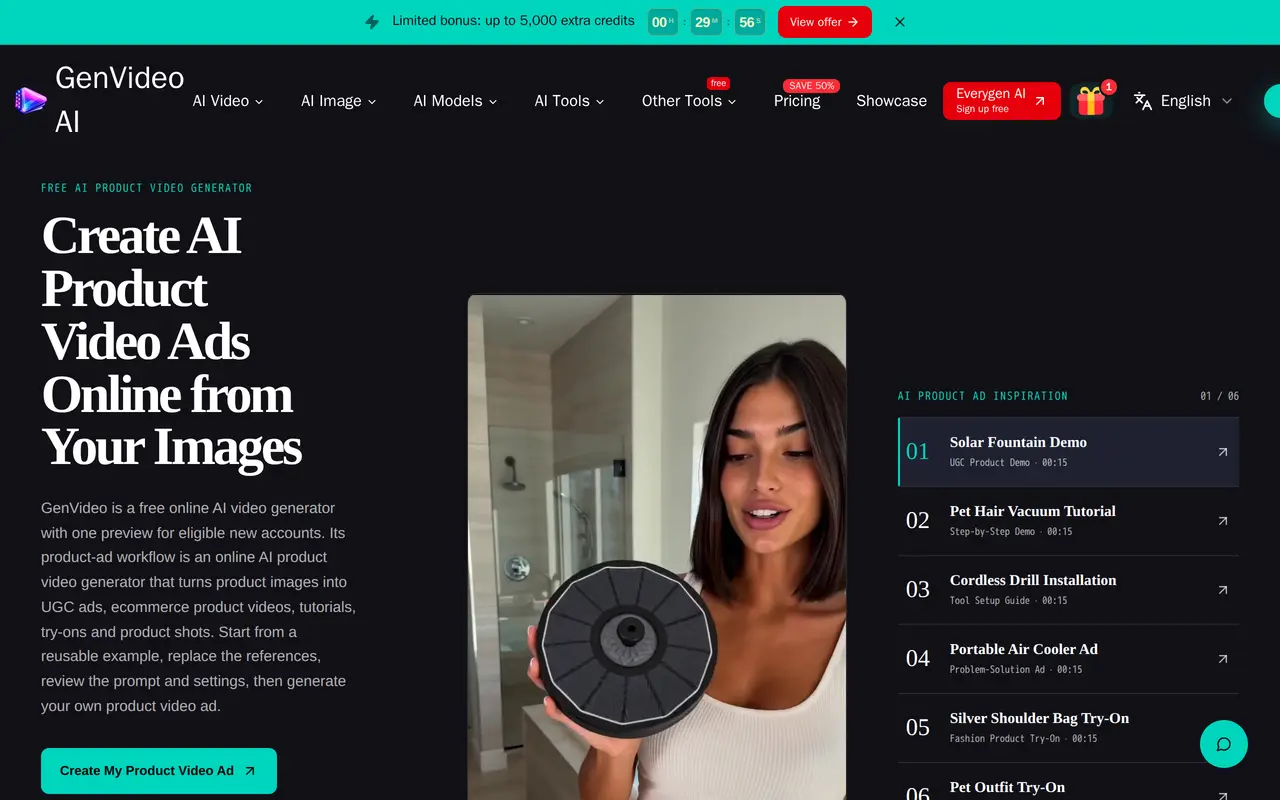
What is GenVideo AI?
GenVideo AI is a browser-based video generator for creating clips from text prompts and images. It supports multiple video models, including Veo, Seedance, Kling, Wan and Grok Imagine. Its product-ad workflow helps creators and ecommerce teams turn product photos into demonstrations, unboxing clips, try-ons, launch videos and UGC-style ads.
Users can start with one of more than 90 product-ad examples, replace the reference images and adjust the prompt. Settings include aspect ratio, duration, quality and model, with available options depending on the model selected. GenVideo shows the credit cost before generation, and finished clips remain available in My Creations for review and download.
Eligible new accounts receive one free preview, with credit purchases available for further generation. Videos need checking before publication because AI can alter packaging, labels, logos, faces, hands and product details. Users must have permission to use their source materials. GenVideo produces video files but does not publish ads or manage advertising spend.
What can GenVideo AI do?
Text and image inputs
Generate video from a written prompt or animate an image.
Reusable product-ad examples
Start from more than 90 examples covering demos, unboxing, try-ons, launches and other product-ad formats.
Multiple video models
Choose among models including Veo, Seedance, Kling, Wan and Grok Imagine.
Generation settings and costs
Adjust format, duration, quality and model, then check the credit cost before generating.
Saved video library
Reopen generated clips in My Creations to review them and download the files.
Who is GenVideo AI for?
- Ecommerce teams
- Create product demonstrations, try-ons and promotional clips from product photos.
- Marketing teams
- Produce product-ad drafts and UGC-style creatives for paid social campaigns.
- Content creators
- Generate social clips and storytelling visuals from text or images.
How much is GenVideo AI?
Official pricing7,000 credits
$49 one-time
20,000 credits
$109 one-time
45,000 credits
$229 one-time
Free plan: One free preview for eligible new accounts.
Frequently asked questions
Can I try GenVideo AI for free?
Eligible new accounts receive one free preview. Further generation uses credits.
How much do credit packs cost?
One-time packs are listed at $49 for 7,000 credits, $109 for 20,000 credits and $229 for 45,000 credits. The latter two totals include promotional bonus credits.
Can I control the video's format and length?
You can choose the aspect ratio, duration, quality and AI model. Available options and credit costs vary by model.
Does GenVideo publish ads for me?
No. It generates the video file; you choose where to publish it and manage any advertising spend separately.
What should I check before using a generated product ad?
Review the full clip for changes to product shape, packaging, text, logos, faces and hands. Use only source images, people, music and other materials that you own or have permission to use.
GenVideo AI alternatives
Compare alternatives- 1
 OumomoCreate AI UGC-style product videos and schedule them for TikTok.
- 2
 WizstarCreate AI videos, product ads, talking avatars, and localized content.
- 3
 PixelPromptGenerate ecommerce product photos and short UGC videos from structured prompts.
- 4
 Vmake LabsCreate and edit AI product videos for social media, ads, and ecommerce.
- 5
 ChatCutEdit and generate videos by describing the changes you want.
More AI Video Generators
See more
CapCut
AI Video Editors
Edit videos, generate visuals, and add AI captions, voiceovers, and audio cleanup.

OpenArt
AI Image Generators
Generate and edit AI images, videos, characters, music, and voiceovers in one workspace.

DeepAI
AI Image Generators
Generate images, videos and music, edit photos, and chat with AI in one platform.

Pixelcut
AI Product Photography
Generate and edit product photos, brand images, and videos with AI.

VEED
AI Video Editors
Generate, edit, subtitle, and dub videos with AI in one platform.

Adobe Firefly
AI Image Generators
Generate and edit images, videos, and audio with AI.