
商品套图
Visit websiteGenerate ecommerce product image sets from reference photos and product details.
Verified Nov 3, 2026
What is 商品套图?
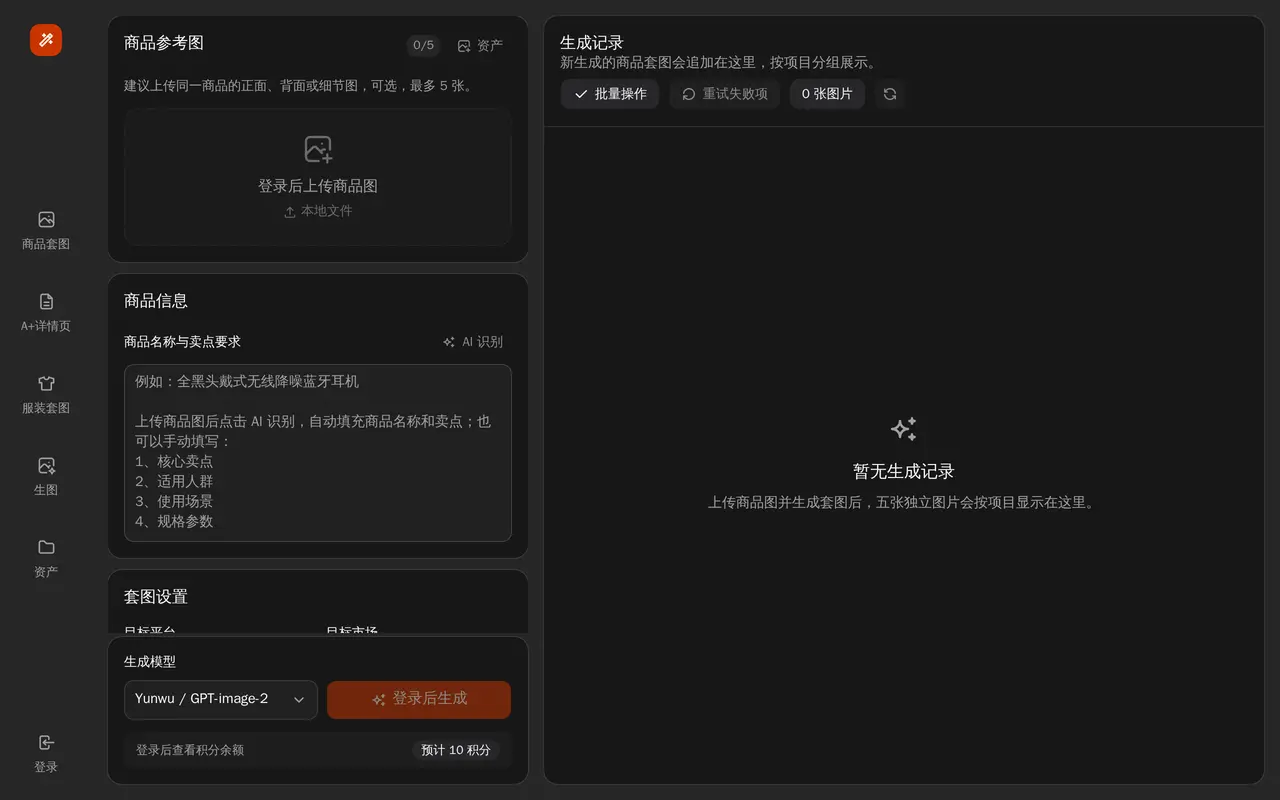
Yushus is an AI image workspace for ecommerce sellers creating product image sets. It brings product sets, A+ detail pages, fashion sets, image generation, and asset management into one web interface. The product-set workflow combines reference photos, product information, and output settings to generate five separate images grouped as a project.
Users can optionally upload up to five reference images, such as front, back, or detail views of the same item. They can enter a product name and selling-point requirements, with an AI recognition option also available. Settings include the target platform, target market, copy language, image ratio, AI image planning, and generation model.
Generated sets appear in a project-based history with batch actions and an option to retry failed items. Signing in is required to upload product photos, generate images, and check the credit balance. Generation uses credits, with an estimated credit cost displayed before running.
What can 商品套图 do?
Product reference photos
Use up to five optional reference images to show different views or details of the same product.
Product details and AI recognition
Enter a product name and selling-point requirements, or use the AI recognition option.
Image-set settings
Set the target platform, market, copy language, image ratio, and generation model.
Five-image product sets
Generate five separate product images and keep each set grouped as a project.
Generation history and retries
Review generated projects, apply batch actions, and retry failed images.
Who is 商品套图 for?
- Ecommerce sellers
- Create product image sets and A+ detail-page assets for online listings.
- Fashion sellers
- Use the fashion-set workspace to prepare images for clothing products.
Frequently asked questions
Do I need an account to generate images?
Yes. Signing in is required to upload product photos, generate image sets, and view your credit balance.
How many reference photos can I upload?
You can optionally upload up to five images of the same product, including front, back, or detail views.
How are generated images organized?
Each new product set contains five separate images grouped as a project in the generation history. Failed items can be retried.
商品套图 alternatives
Compare alternatives- 1
 Product Creative GeneratorTurn product photos into coordinated ecommerce listing, banner, and social image sets.
- 2
 VisualPilot AIGenerate marketplace main images and product detail graphics from a product photo.
- 3
 PixelListingGenerate ecommerce listing images, lifestyle scenes, and ads from product photos.
- 4
 ReelWandGenerate and edit product photos, portraits, illustrations, and brand visuals with AI.
- 5
 3D Camera ControlGenerate new camera angles from a single reference image using AI.
More AI Product Photography
See more
Photoroom
AI Product Photography
Create and edit product photos, listing images, and video ads with AI.

Pixelcut
AI Product Photography
Generate and edit product photos, brand images, and videos with AI.

FancyAI
AI Agents
Role-based AI agents for enterprise creative, analytics, and software workflows.

Pebblely
AI Product Photography
Create AI product photos with custom backgrounds for listings, ads, and social media.

Editaimg
AI Photo Editors
Edit photos with text prompts, remove objects, upscale images, and create product scenes.

ForgeEcho
AI Product Photography
Create ecommerce product photos, ad scripts, and voiceovers in one AI workspace.