
SupaImagine
Visit websiteGenerate and edit images and create videos with multiple AI models in one workspace.
Verified Nov 2, 2026
What is SupaImagine?
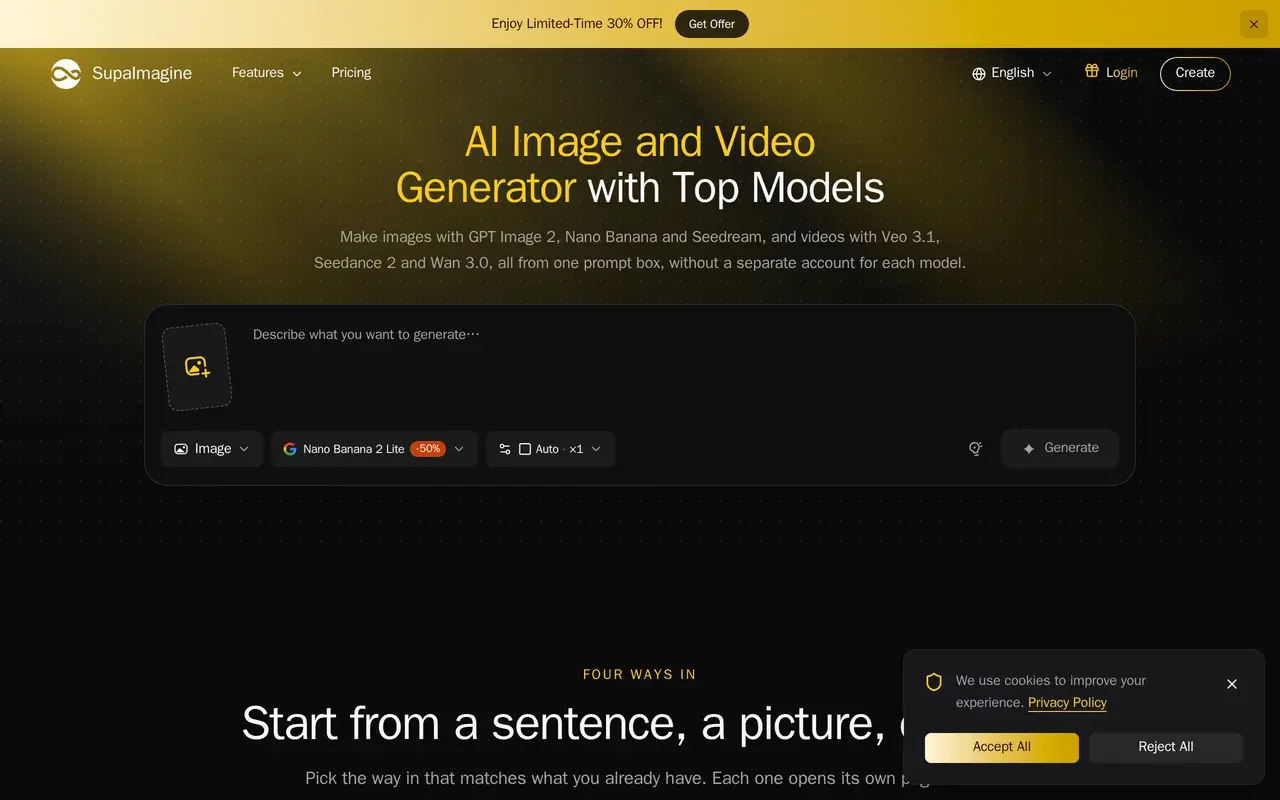
SupaImagine is a web-based AI image and video generator that provides access to multiple third-party models through one interface and a shared credit balance. Users can generate images from text, edit uploaded pictures, create videos from prompts, or animate still images without maintaining a separate account for each model.
The workflow starts by choosing a generation mode and model, then entering a prompt and uploading reference material when needed. Image tools support changes to backgrounds, lighting and style, while video options include sound generation, reference inputs, and first- and last-frame controls on supported models. Results are saved in My creations with their prompts and model choices for reuse. Typical uses include product listing images, short social ads, covers, thumbnails and storyboard sequences.
Credit costs vary by model, resolution and video duration, with the cost displayed before generation. New accounts receive 10 free credits for personal, non-commercial use. Paid plans and credit packs unlock higher resolutions and multiple images per run; paid subscriptions also include commercial-use rights subject to the service’s terms and model-provider rules.
What can SupaImagine do?
Multiple models in one workspace
Choose among image and video models using one account and a shared credit balance.
Image generation and editing
Create images from prompts or upload references to change backgrounds, lighting and visual style.
Text and image to video
Generate clips from descriptions or animate still images, with sound and frame controls on supported models.
Reusable creation history
Save results with their prompts and model choices to rerun a setup or try it with another model.
Generation cost preview
See the credit cost before starting a run, with automatic credit refunds for failures on the service’s side.
Who is SupaImagine for?
- E-commerce sellers
- Create product listing images and place existing product photos in different settings.
- Marketing teams
- Produce still images and short video clips for ads and social campaigns.
- Content creators
- Make covers, thumbnails and reference-based visuals for recurring content.
- Storyboard artists
- Draft key frames as images and animate selected frames into short sequences.
How much is SupaImagine?
Official pricingBasic Monthly
$19.90/mo
Standard Monthly
$39.90/mo
Pro Monthly
$99.90/mo
Basic Yearly
$178.80/yr
Standard Yearly
$358.80/yr
Pro Yearly
$838.80/yr
Free plan: New accounts receive 10 free credits for personal, non-commercial use, with no credit card required.
Frequently asked questions
Can I use SupaImagine for free?
New accounts receive 10 free credits without a credit card. Outputs made only with free credits are restricted to personal, non-commercial use.
How much do subscriptions cost?
Monthly billing costs $19.90 for Basic, $39.90 for Standard and $99.90 for Pro. Discounted yearly billing is listed at $178.80, $358.80 and $838.80 respectively.
How are generation credits charged?
Images are charged per image, while videos are charged per clip or per second depending on the model. Resolution and duration affect the cost, which is displayed before generation; failed runs on the service’s side are refunded automatically.
Can I use generated content commercially?
Paid plans include commercial use subject to SupaImagine’s terms and the model providers’ rules. Users are responsible for having the rights to uploaded material.
How long are uploads and results stored?
Uploads and results are retained for about 30 days after creation, and for as long as an active subscription is maintained. Download files you want to keep longer.
Are uploads used to train AI models?
SupaImagine says it does not use prompts or results to train its own models, and uploaded photos of people are never used for training. Third-party model providers process inputs under their own terms.
SupaImagine alternatives
Compare alternatives- 1
 AnyAIHubGenerate and edit images and create videos using multiple AI models.
- 2
 Inkfox AIGenerate and edit images and videos for ads, product listings, and social content.
- 3
 Zeva AIGenerate and edit images or create short videos from text prompts and photos.
- 4
 VioEvo AIGenerate and edit AI images and videos from prompts, photos, and clips.
- 5
 Adobe FireflyGenerate and edit images, videos, and audio with AI.
More AI Image Generators
See more
CapCut
AI Video Editors
Edit videos, generate visuals, and add AI captions, voiceovers, and audio cleanup.

OpenArt
AI Image Generators
Generate and edit AI images, videos, characters, music, and voiceovers in one workspace.

DeepAI
AI Image Generators
Generate images, videos and music, edit photos, and chat with AI in one platform.
Artlist
AI Video Generators
Generate and edit videos, images, voiceovers, music, and 3D assets in one workspace.

Fotor
AI Photo Editors
Edit and enhance photos, generate images, and create designs with AI tools.

ImagineArt
AI Image Generators
Generate and edit images, video and audio with brand controls and automated workflows.