
NetPilot
Visit websiteBuild and validate multi-vendor network labs with an AI agent.
Verified Nov 2, 2026
What is NetPilot?
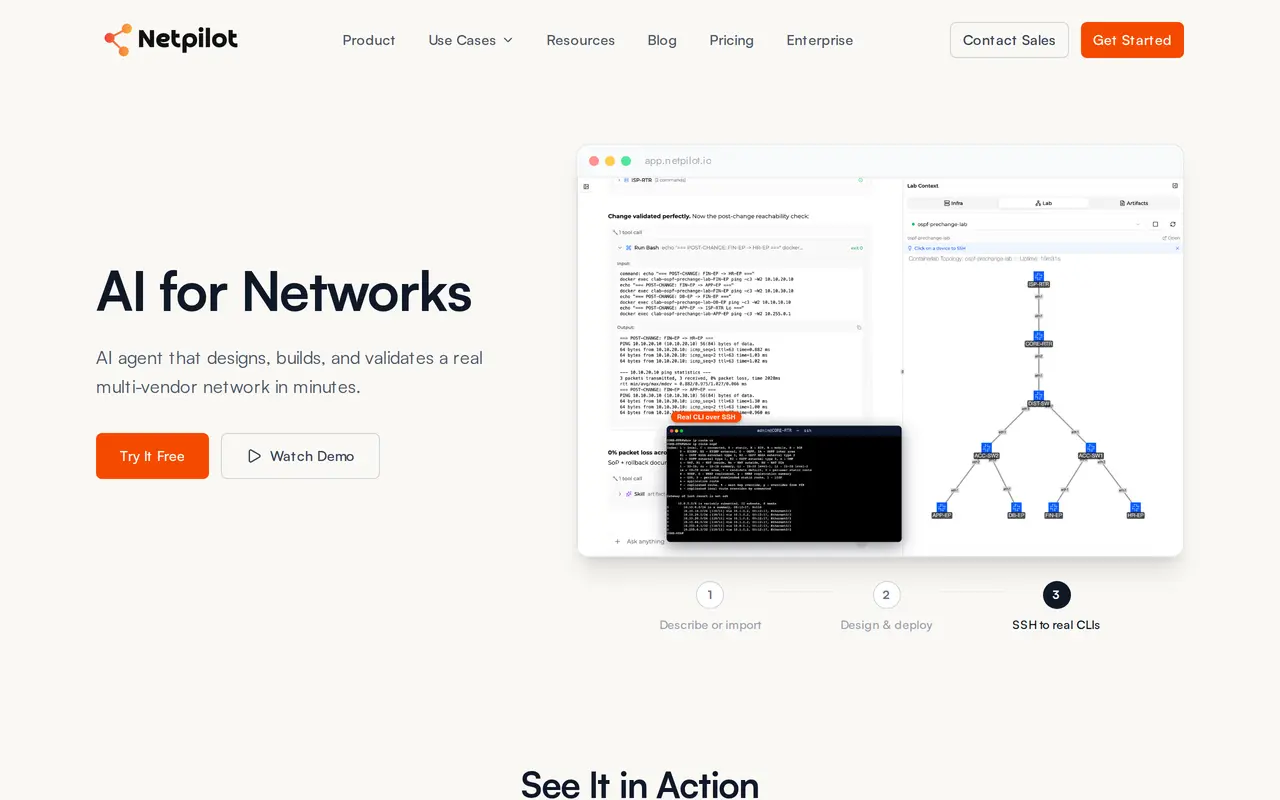
NetPilot is an AI agent for network engineers that designs, configures, and deploys multi-vendor network labs. Users describe a topology or change in plain English, or import existing device configurations. The agent generates vendor-specific configurations and builds a running environment where engineers can inspect devices through real SSH command-line interfaces.
The labs run actual network operating systems rather than simulated device behavior. Nokia SR Linux, FRR, and Linux are included, while commercial platforms such as Cisco, Juniper, and Arista use customer-supplied images. Engineers can revise a lab through follow-up instructions, test routing protocols, generate traffic, and investigate failure scenarios. Imported production configurations can form an on-demand digital twin for testing changes before deployment.
The cloud version works through a browser, with on-premises deployment available for enterprise teams. NetPilot also exposes an MCP server and offers connectors for ChatGPT, Claude, and Muse. Plans differ in AI credits, lab credits, retention, VM capacity, and supported image options; free live-lab access is a one-time trial.
What can NetPilot do?
Prompt-to-lab deployment
Describe a network in plain English and let the agent design its topology, generate configurations, and deploy the lab.
Real multi-vendor device CLIs
Access actual network operating systems over SSH, with built-in images and bring-your-own-image support.
Production change validation
Import device configurations to build a lab for testing routing changes, firewall policies, and failure scenarios.
Conversational lab changes
Use follow-up instructions to add devices or change protocols and have the agent update configurations across the lab.
Assistant and MCP connections
Build and validate labs through the MCP server or connectors for ChatGPT, Claude, and Muse.
Packet Tracer file support
Import and export Cisco Packet Tracer .pkt files on the Pro plan and above.
Who is NetPilot for?
- Network engineers
- Test configuration changes and troubleshoot multi-vendor behavior before modifying production networks.
- Sales engineers
- Build customer-specific proof-of-concept environments for product demonstrations.
- Network researchers
- Create lab topologies to investigate protocols, routing designs, and interoperability.
How much is NetPilot?
Official pricingFree
Free
Pro
$20/mo
Max
$100/mo
Free plan: $2 in monthly AI credits and a one-time live-lab trial of approximately four hours, with no credit card required.
Frequently asked questions
What can I use for free?
The Free plan includes $2 in monthly AI credits and a one-time live-lab trial of approximately four hours. No credit card is required.
How much do paid plans cost?
Pro costs $20 per month, or $15 per month billed yearly, and includes $20 in monthly AI credits plus 50 monthly lab credits. Max costs $100 per month and includes $120 in monthly AI credits plus 150 monthly lab credits.
Do I need to install software?
The cloud version runs through a browser without a local VM or server installation. Enterprise teams can also use an on-premises deployment.
Which network operating systems are included?
Nokia SR Linux, FRR, and Linux are built in. Commercial systems such as Cisco, Juniper, and Arista require bring-your-own-image support, with available options depending on the plan.
Can other AI assistants use NetPilot?
NetPilot provides an MCP server for agents to build and validate labs. Pro and Max also include connectors and plugins for ChatGPT, Claude, and Muse.
NetPilot alternatives
Compare alternatives- 1
 ClineAn open-source coding agent for your editor, desktop, terminal, and applications.
- 2
 OsaurusRun local AI agents that work with your files, remember context, and ask before editing.
- 3
 CursorAn AI coding editor and agent for building, testing, and reviewing software.
- 4
 JetBrainsAI-powered development tools and coding agents for developers and software teams.
- 5
 Devin DesktopManage local and cloud coding agents, review changes, and write code in one IDE.
More AI Agents
See more
Claude
AI Assistants
An AI assistant for research, writing, coding, and tasks across your files and apps.
Notion
AI Agents
Organize team knowledge, search connected apps, and automate work with AI agents.

MiniMax
AI Models
AI models, developer APIs, and apps for language, video, speech, and music.

NoteGPT
AI Agents
An AI agent for research, summaries, documents, slides, and multimedia creation.

Pollo AI
AI Video Generators
Create and edit AI videos, images, and marketing assets with multiple models.

Elicit
AI Research Tools
Search scientific literature, extract evidence, and generate cited research reports.