
Monica
Visit websiteChat with multiple AI models, write, research, and create across your apps and devices.
Verified Nov 2, 2026
What is Monica?
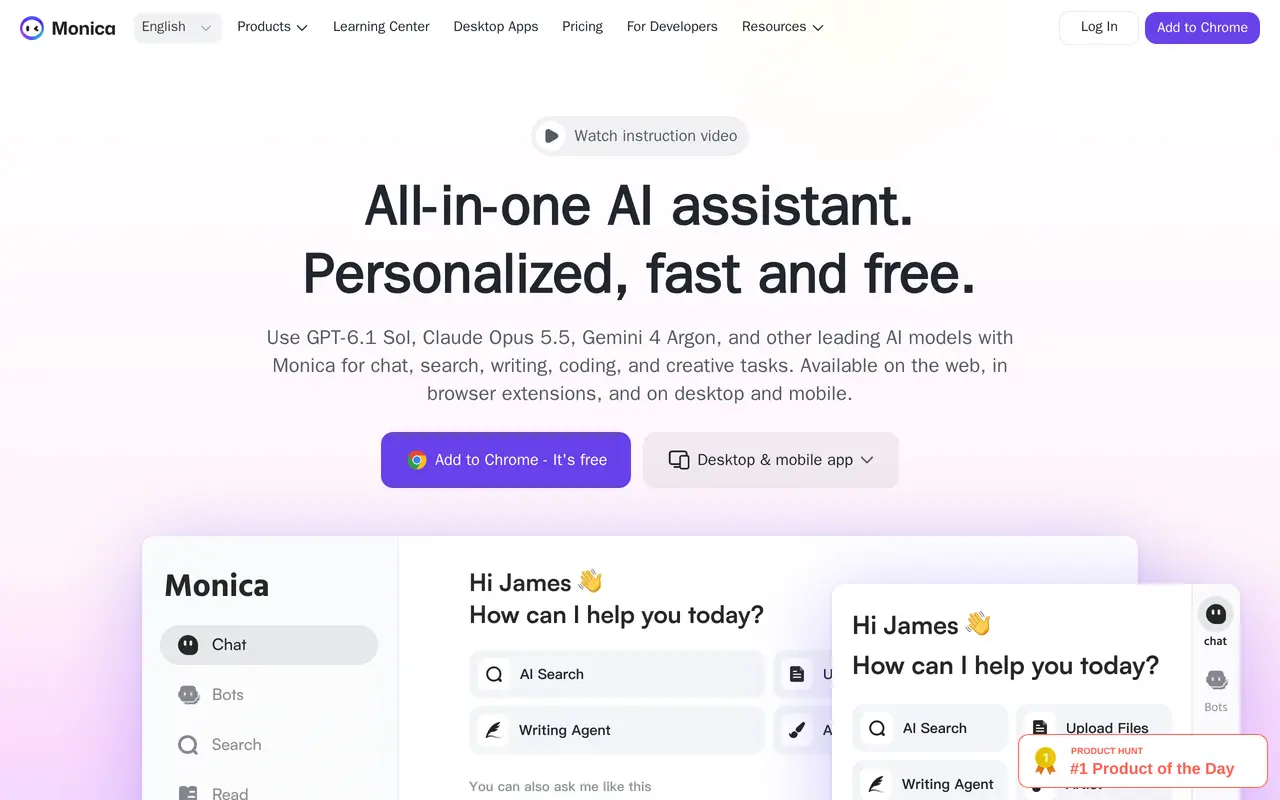
Monica is an AI assistant that brings multiple models together for chat, writing, research, translation, and creative work. It runs on the web, through a Chrome extension, and in desktop and mobile apps. Users can ask questions, compare model responses, summarize documents, and generate images or videos within the same service.
In the browser, Monica provides a sidebar for working alongside webpages and a toolbar that explains, translates, or summarizes selected text. Its writing tools draft and revise content, while email features suggest replies based on the conversation. Reading tools include webpage and file summaries, YouTube summaries, and ChatPDF for working with PDF documents. Agent features cover deeper research, slide creation, image work, and browser operation.
The free plan provides a daily allowance of basic-model access and limited trials of several other features. Paid plans add advanced-model access and credits used for agent tasks, media generation, and some document tools. Accounts are intended for individual use; sharing accounts or making non-personal automated or batch calls can lead to restrictions.
What can Monica do?
Multi-model chat
Use multiple AI models in one assistant and compare their answers.
Browser sidebar and toolbar
Ask questions alongside webpages or explain, translate, and summarize selected text.
Writing and email assistance
Draft and rewrite content, check grammar, and generate context-aware email replies.
Document and video summaries
Summarize webpages, files, and YouTube videos, or use ChatPDF to work with PDF documents.
Research and agent tools
Use agent features for deep research, slide creation, image work, and browser operation.
Image and video generation
Create images and videos using generation models, with usage charged against advanced credits on paid plans.
Who is Monica for?
- Researchers and analysts
- Summarize documents, investigate topics, and prepare market or competitor research.
- Marketing professionals
- Draft and revise marketing content and create visual assets.
- Entrepreneurs
- Explore business questions, analyze reports, and prepare presentations.
- Customer service professionals
- Extract key points from emails and draft contextual responses.
How much is Monica?
Official pricingUltra
$995/yr
Max
$199/yr
Pro
$99/yr
Free
Free
Free plan: Monica offers 40 basic-model accesses daily, basic writing, translation, and summarization tools, and limited trials of image/video generation, ChatPDF, and AI Agent.
Frequently asked questions
Can I use Monica for free?
The free plan includes 40 basic-model accesses per day, basic writing, translation, and summaries. It also includes limited trials of image and video generation, ChatPDF, and AI Agent.
Where can I use Monica?
Monica is available on the web, as a Chrome extension, and through macOS, Windows, iOS, and Android apps.
How much do the paid plans cost?
Annual billing costs $99 for Pro, $199 for Max at the displayed promotional price, and $995 for Ultra. The advertised monthly equivalents apply to yearly billing.
What are advanced credits used for?
Advanced credits cover features including agent tasks, image and video generation, and ChatPDF. Pro includes 1,500 credits, Max includes 4,500, and Ultra includes 20,000.
Can multiple people share an account?
Monica accounts are for personal use only. Account sharing, multi-user use, and non-personal automated or batch calls may result in suspension or restrictions.
Monica alternatives
Compare alternatives- 1
 Lorka AIUse multiple AI chat models, research tools, and image generators in one workspace.
- 2
 GrokAn AI assistant for chat, image creation, code and real-time answers.
- 3
 Microsoft CopilotChat with AI to find answers, summarize information, draft content, and generate images.
- 4
 ChatGPTAn AI chat assistant for questions, writing, coding, and image creation.
- 5
 QwenChat with Qwen models and work with images, documents, voice, and video.
More AI Assistants
See more
Claude
AI Assistants
An AI assistant for research, writing, coding, and tasks across your files and apps.
Gemini
AI Assistants
Google’s AI assistant for writing, planning, brainstorming, learning, and coding.

Speechify
Text to Speech
Read text aloud, dictate writing, and ask questions about documents with AI.

Mistral
AI Models
AI models, agents, and development tools for hosted or private deployment.

DeepSeek
AI Chatbots
A free AI chat assistant for everyday questions and problem-solving.
AutoGPT
AI Agents
Coordinate AI specialists for research, content, sales, and recurring workflows.