
Voicemaker
Visit websiteTurn text into speech with a large library of AI voices in many languages.
Verified Nov 2, 2026
What is Voicemaker?
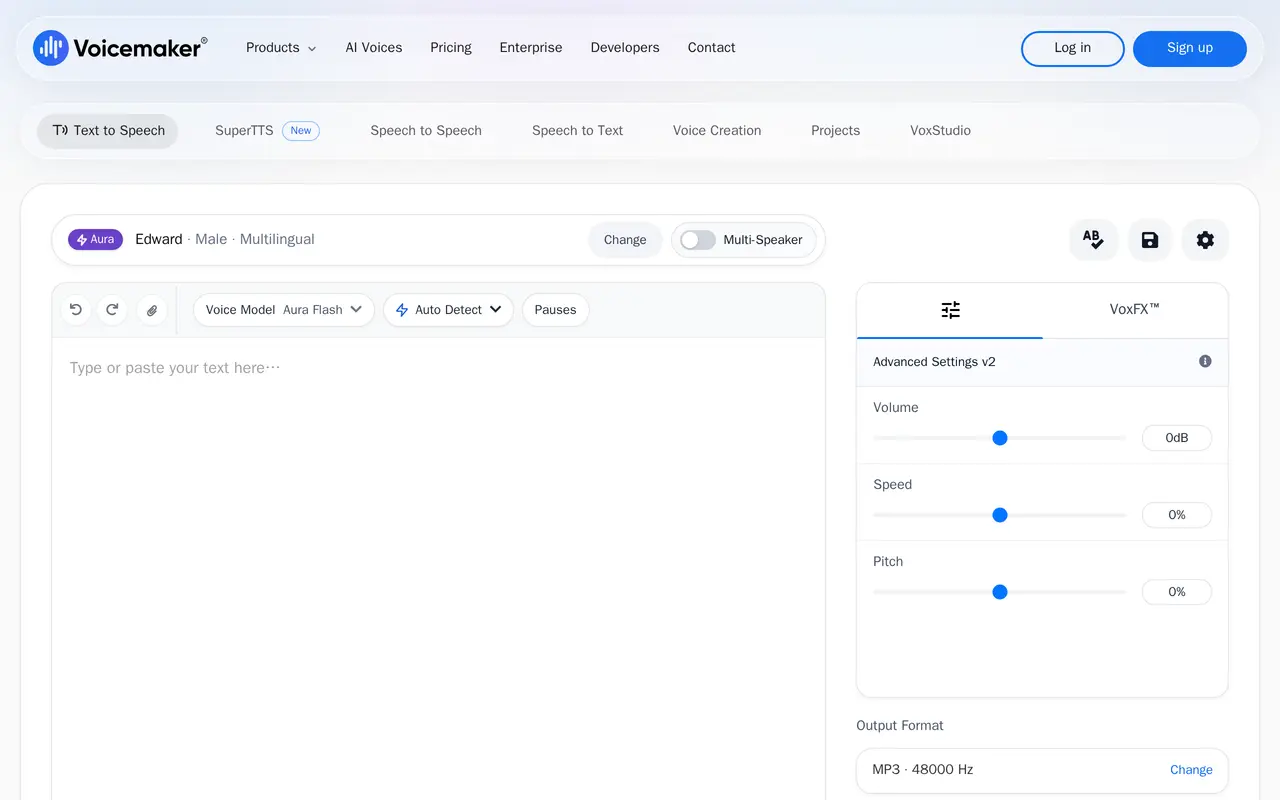
Voicemaker is a browser-based text-to-speech studio that converts written text into spoken audio using a library of more than 2,000 AI voices across roughly 130 languages and accents. You paste or type text, pick a voice and model, adjust volume, speed, pitch and pauses, preview the result, and export the finished audio.
Beyond basic narration, the service offers voice cloning from about a minute of sample audio, speech-to-speech conversion that restyles an uploaded or recorded voice, and AI dubbing that translates speech into other languages while keeping the original tone. A pronunciation editor fixes how names and brand terms are spoken, a multi-track Projects editor handles longer productions, and VoxFX adds effects such as radio, stadium echo or cave acoustics. Speech-to-text with SRT export and a low-latency developer API are also available.
Audio can be downloaded as MP3, WAV, OGG, AAC or OPUS, with high-resolution output at 48 kHz on higher plans. Usage is metered in credits, and different voice models consume credits at different rates per character. The free plan caps each conversion at 250 characters and limits voice selection; commercial usage rights start on the paid Starter plan. Teams, enterprise and a dedicated audiobook and podcast plan are offered separately.
What can Voicemaker do?
2,000+ AI voices
Pick from a large voice library spanning narrators, character voices and accents in over 130 languages.
Expressive voice models
Add emotion, pacing, tone shifts and ambient effects with the newer Expressive and Pro voice models.
Custom voice cloning
Create a custom voice from about a minute of audio, with clone slots depending on your plan.
AI dubbing and speech-to-speech
Translate and dub recordings into other languages, or restyle a recorded voice while keeping its tone.
Projects and pronunciation editor
Arrange multiple tracks in one project and lock in how names, brands and technical terms are pronounced.
Developer API
Generate speech from your own applications with a low-latency API that returns audio in real time.
Who is Voicemaker for?
- Video and YouTube creators
- Narrate shorts, videos and social content with character and style voices suited to each format.
- Marketing and creative teams
- Produce multilingual promos, trailers and campaign voiceovers without booking studio talent.
- E-learning and training teams
- Generate course narration and localized versions of training material at scale.
- Developers and businesses
- Add speech generation to products and automated workflows through the voice API.
How much is Voicemaker?
Official pricingFree
Free
Starter
$5/mo
Creator
$10/mo
Pro
$24/mo
Credit top-up
$20 one-time
Team seat
$20/yr
Voice clone slot
$2/yr
Audiobook & Podcast Creation
$25/yr
Free plan: The Free plan includes 25,000 credits per month, selected voices, and up to 250 characters per conversion.
Frequently asked questions
How much does Voicemaker cost?
Paid individual plans are $5 per month for Starter, $10 per month for Creator and $24 per month for Pro, with monthly and yearly billing options. There is also a free plan, a $25-per-year audiobook and podcast plan, and one-time credit top-ups at $20 per 1M credits.
Is there a free plan?
Yes. The free plan gives 25,000 credits per month with access to selected voices, a 250-character limit per conversion and limited generations.
Can I use the generated audio commercially?
Commercial usage rights are included from the Starter plan upward; the free plan is limited to personal use.
Which audio formats are supported?
Downloads are available as MP3, WAV, OGG, AAC or OPUS. Higher plans add 48 kHz WAV at 320 kbps, while lower tiers use 128 kbps MP3/OGG.
Is there an API for developers?
Yes, a developer API is offered with real-time generation, and the vendor states response times of around 75 ms from servers in multiple regions.
Do unused credits roll over?
Credit rollover of one month is listed as a feature on the Pro plan and applies to monthly billing.
Voicemaker alternatives
Compare alternatives- 1
 Fish AudioGenerate expressive speech, clone voices, and build voice-enabled applications.
- 2
 ElevenLabsGenerate AI speech, clone voices, create audio, and deploy conversational agents.
- 3NaturalReaderTurn documents, webpages, and scripts into AI speech for reading and voiceovers.
- 4
 LuvvoiceConvert text and documents into AI speech in more than 70 languages.
- 5
 TypecastGenerate expressive AI voiceovers with emotion controls and voice cloning.
More Text to Speech
See more
Clideo
AI Video Editors
Edit videos online with automatic subtitles, translation, and text-to-speech tools.

Speechify
Text to Speech
Read text aloud, dictate writing, and ask questions about documents with AI.

Murf AI
Text to Speech
Create AI voiceovers, dub videos, and build conversational voice agents.

TTSReader
Text to Speech
Read text, documents, ebooks and webpages aloud, or export them as audio.
ForgeEcho
AI Product Photography
Create ecommerce product photos, ad scripts, and voiceovers in one AI workspace.