Lipsync.video
Visit websiteCreate AI video clips and synchronize speech or singing with photos, videos, and avatars.
Verified Nov 2, 2026
What is Lipsync.video?
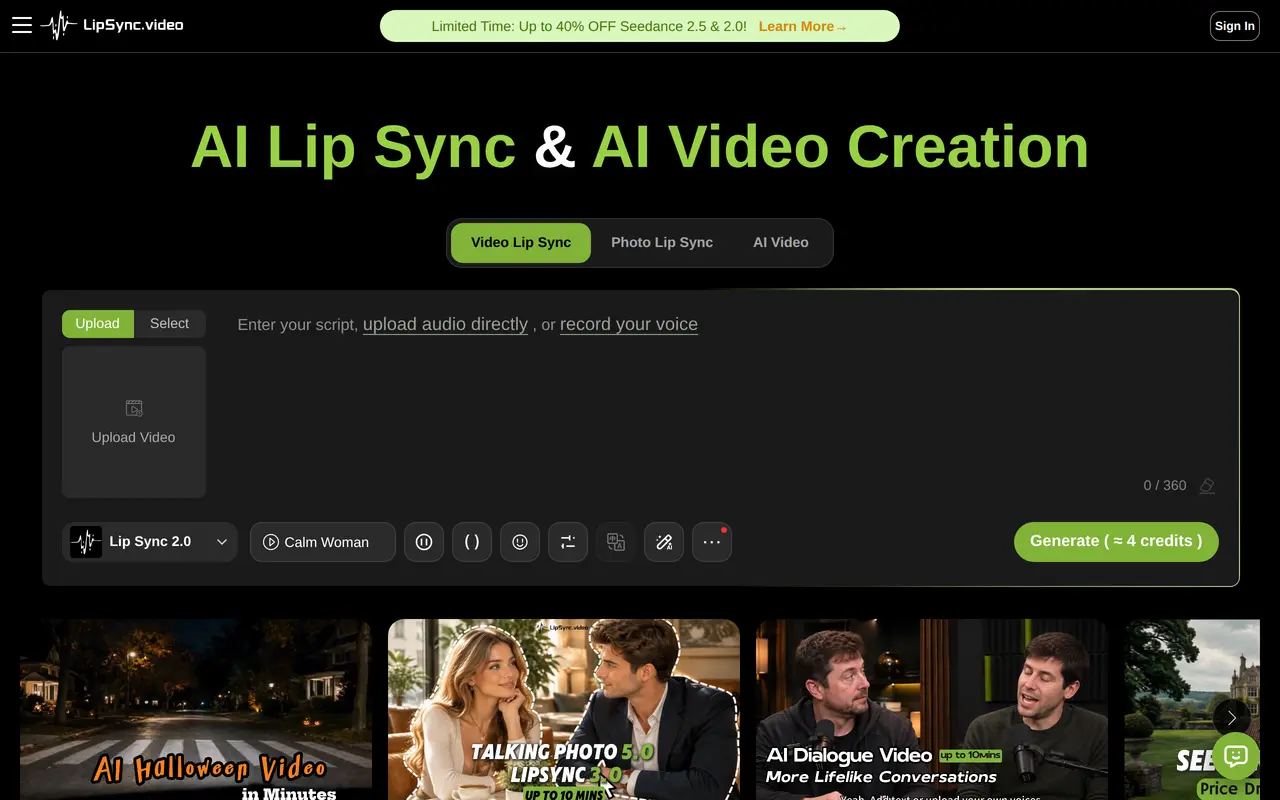
Lipsync.video is a browser-based workspace for generating video clips and making existing characters speak or sing. Users can upload footage, a photo, or an avatar, then supply a script, audio file, or voice recording to create a lip-synced performance. Video-based workflows preserve the source movement and framing, while photo-based workflows animate a still character image.
Its separate AI video generation tools create new shots from text, images, opening and closing frames, or reference media. Motion Control uses a reference performance to guide character movement. Supporting tools generate avatars, images, and text-to-speech audio for presenter videos, ads, stories, lessons, and localized content. Selected lip-sync workflows also let users choose which person speaks in a group image or video.
Lip-sync videos can run up to 10 minutes, while generated video clips support up to 30 seconds, depending on the model and input mode. Generation uses credits, with costs varying by model. Free credits are available through recurring activities, and paid plans provide monthly allowances. The Ultra plan offers unlimited use only for selected older lip-sync, talking-photo, and singing-photo models; other models still consume credits.
What can Lipsync.video do?
Video lip sync
Synchronize new speech or singing with existing character footage while retaining its movement, framing, and scene.
Talking and singing photos
Animate a portrait, avatar, cartoon, or animal image using a script, uploaded audio, or recorded voice.
AI video generation
Generate shots from prompts, images, opening and closing frames, or reference media using a choice of video models.
Speaker selection
Choose which person speaks in group images with Talking Photo 5.0 or group footage with LipSync 3.0.
Reference-based motion control
Guide character actions, poses, and choreography using a reference performance.
Supporting creative tools
Create reusable avatars, image assets, and text-to-speech audio for video projects.
Who is Lipsync.video for?
- Marketing teams
- Create product ads, presenter clips, and localized versions of campaign videos.
- Social content creators
- Produce talking characters, singing photos, and short videos for social feeds.
- Filmmakers and animators
- Explore scenes, camera movement, character performances, and supporting footage.
- Educators and training teams
- Create presenter-led lessons, explainers, and multilingual training content.
How much is Lipsync.video?
Official pricingUltra Unlimited
$159.99/mo
Pro
$29.99/mo
Starter
$9.99/mo
Free plan: Earn limited free credits through daily activities such as logging in, sharing, or following social accounts; credits expire daily or weekly.
Frequently asked questions
Can I use Lipsync.video for free?
Free credits can be earned through activities such as logging in, sharing, or following social accounts. These credits expire on daily or weekly cycles depending on how they were earned.
How long can videos be?
AI lip-sync workflows support videos up to 10 minutes, while AI video generation supports clips up to 30 seconds. Available lengths depend on the selected model and input mode.
Does Ultra include unlimited use of every model?
No. Unlimited use covers LipSync 1.0, Talking 1.0–4.0, and Singing 1.0–2.0 only. Other models, including LipSync 2.0 and video and image generation models, still consume credits.
Do unused credits expire?
Subscription credits expire at the end of each monthly cycle and do not roll over. Purchased one-time pack credits do not expire, while free credits have their own daily or weekly expiration cycles.
How do subscriptions renew?
Monthly subscriptions renew automatically until canceled. Annual subscriptions are paid upfront and do not automatically renew; their credits are distributed monthly.
Can I change the language of existing footage?
Yes. Supply a translated script or audio track, then use Video Lip Sync to synchronize the new speech with the visible character.
Lipsync.video alternatives
Compare alternatives- 1
 Lipsync StudioCreate talking and singing videos from images, audio, text, or existing footage.
- 2
 HeyGenCreate avatar-led videos and translate existing footage with voice cloning and lip sync.
- 3
 Vidnoz AICreate avatar-led videos from text with AI voices, templates, and translation.
- 4
 AI Photo AnimatorTurn photos into short videos with motion prompts, templates and optional sound.
- 5
 VozoTranslate and dub videos with voice cloning, lip sync, and on-screen text translation.
More AI Lip Sync
See more
sync.
AI Lip Sync
AI lip sync and visual dubbing for existing videos, available through a studio and API.
RapDuoMaker
Image to Video
Turn two selfies into a rap duet with AI lyrics, music, vocals, and lip-sync.