
Lipsync Studio
Visit websiteCreate talking and singing videos from images, audio, text, or existing footage.
Verified Nov 2, 2026
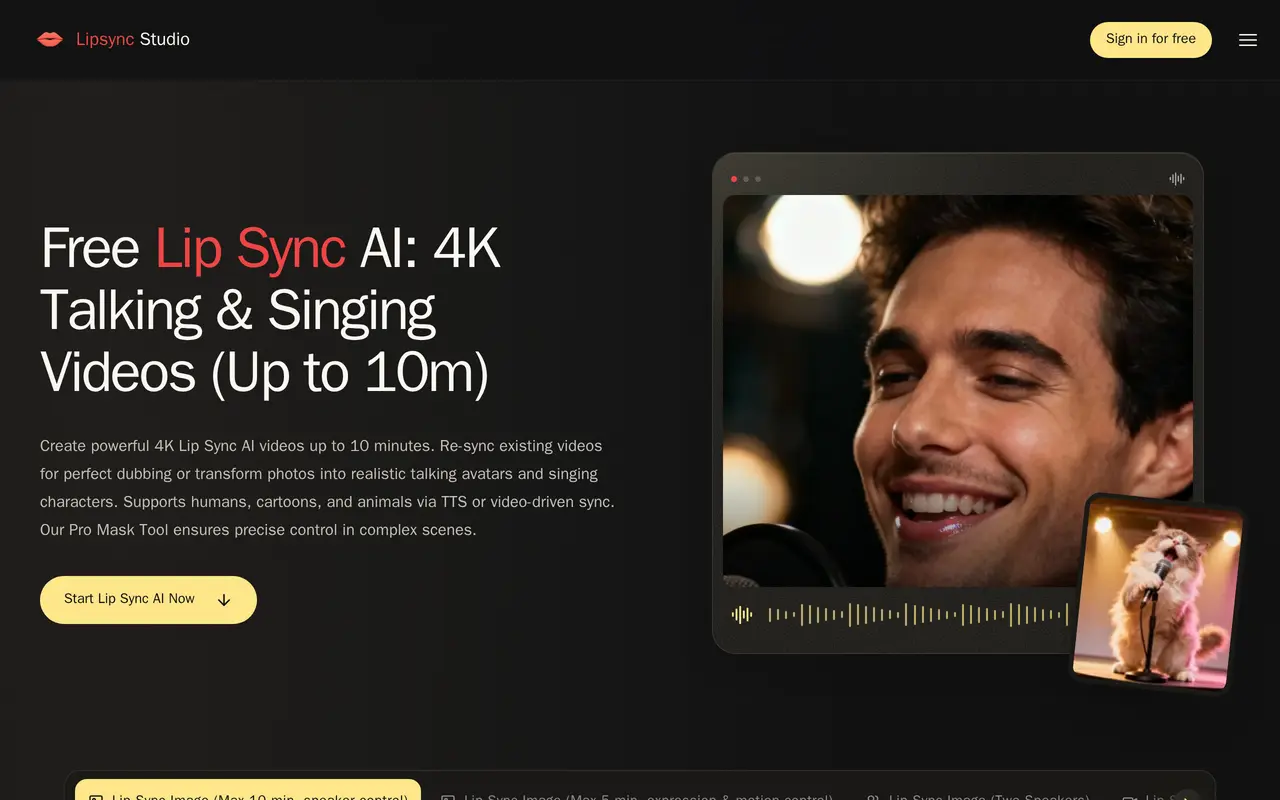
What is Lipsync Studio?
Lipsync Studio is a browser-based AI video tool for creating talking avatars, singing characters, and dubbed footage. It supports human portraits, cartoons, and animals, with image-based lip-sync workflows supporting videos up to 10 minutes and output options up to 4K. Users upload an image or video, add recorded audio or generate speech from text, and choose a generation workflow.
Speaker controls let users mask the character that should speak in a multi-person scene. A two-speaker workflow accepts separate audio tracks for dialogue, while a mouth-region mode focuses changes on the lips in existing footage. Other workflows translate videos into another language or generate scenes from reference images, audio, and prompts describing camera movement and expressions.
The tool is intended for social clips, virtual hosts, educational content, podcasts, and product ads. Signing in provides daily free credits, while paid subscriptions and one-time credit purchases support additional generation. Duration limits depend on the selected workflow, and mouth-region editing requires visible lips with detectable movement in the source video.
What can Lipsync Studio do?
Image-to-video lip sync
Turn a portrait into a talking or singing video using uploaded audio or generated speech.
Speaker masking
Select which character speaks in an image or video containing multiple people.
Two-speaker dialogue
Animate two characters with separate audio tracks, or keep one silent while the other speaks.
Existing video dubbing
Replace speech in uploaded footage with lip synchronization, including a mode focused on the mouth region.
Video translation
Translate source videos into a target language with synchronized speech using Fast or Advanced mode.
Prompted video generation
Generate talking scenes from prompts and reference media with directions for camera movement, expressions, and transitions.
Who is Lipsync Studio for?
- Content creators
- Create talking avatars, singing portraits, and character videos for social channels.
- Educators
- Produce presentation-style videos, lectures, and localized course content.
- Marketing teams
- Generate product ads and translate promotional videos for different audiences.
- Podcast creators
- Turn separate speaker recordings into animated two-person conversations.
How much is Lipsync Studio?
Official pricingStandard
$49.99/mo
Pro
$99.99/mo
Basic
$29.99/mo
300,000 credits
$9,999 one-time
140,000 credits
$4,999 one-time
80,000 credits
$2,999 one-time
40,000 credits
$1,999 one-time
16,000 credits
$999 one-time
8,000 credits
$499 one-time
3,000 credits
$199 one-time
Free plan: Signed-in users receive daily free credits.
Frequently asked questions
Can I use Lipsync Studio for free?
Signed-in users receive daily credits to try video generation.
What video lengths and resolutions are supported?
Output options range from 360p to 4K. The image workflow with speaker control supports up to 10 minutes, while the expression and motion control image workflow supports up to 5 minutes.
How do two-speaker videos work?
Upload a two-person image and one audio track per speaker. Each track should contain only its matching speaker's voice while preserving the conversation's timing.
Can I animate only one person in a group?
Yes. Speaker-control workflows let you mask the intended character after uploading the image or video.
Do one-time credits expire?
Credits bought through one-time purchases do not expire.
Can generated videos be private?
The Basic, Standard, and Pro subscriptions allow private videos.
Lipsync Studio alternatives
Compare alternatives- 1
 Lipsync.videoCreate AI video clips and synchronize speech or singing with photos, videos, and avatars.
- 2
 HeyGenCreate avatar-led videos and translate existing footage with voice cloning and lip sync.
- 3
 Vidnoz AICreate avatar-led videos from text with AI voices, templates, and translation.
- 4
 VozoTranslate and dub videos with voice cloning, lip sync, and on-screen text translation.
- 5
 AI Photo AnimatorTurn photos into short videos with motion prompts, templates and optional sound.
More AI Lip Sync
See more
sync.
AI Lip Sync
AI lip sync and visual dubbing for existing videos, available through a studio and API.
RapDuoMaker
Image to Video
Turn two selfies into a rap duet with AI lyrics, music, vocals, and lip-sync.